
WhatsApp Chatbot for Business: The 2026 India Guide to Costs and Rules
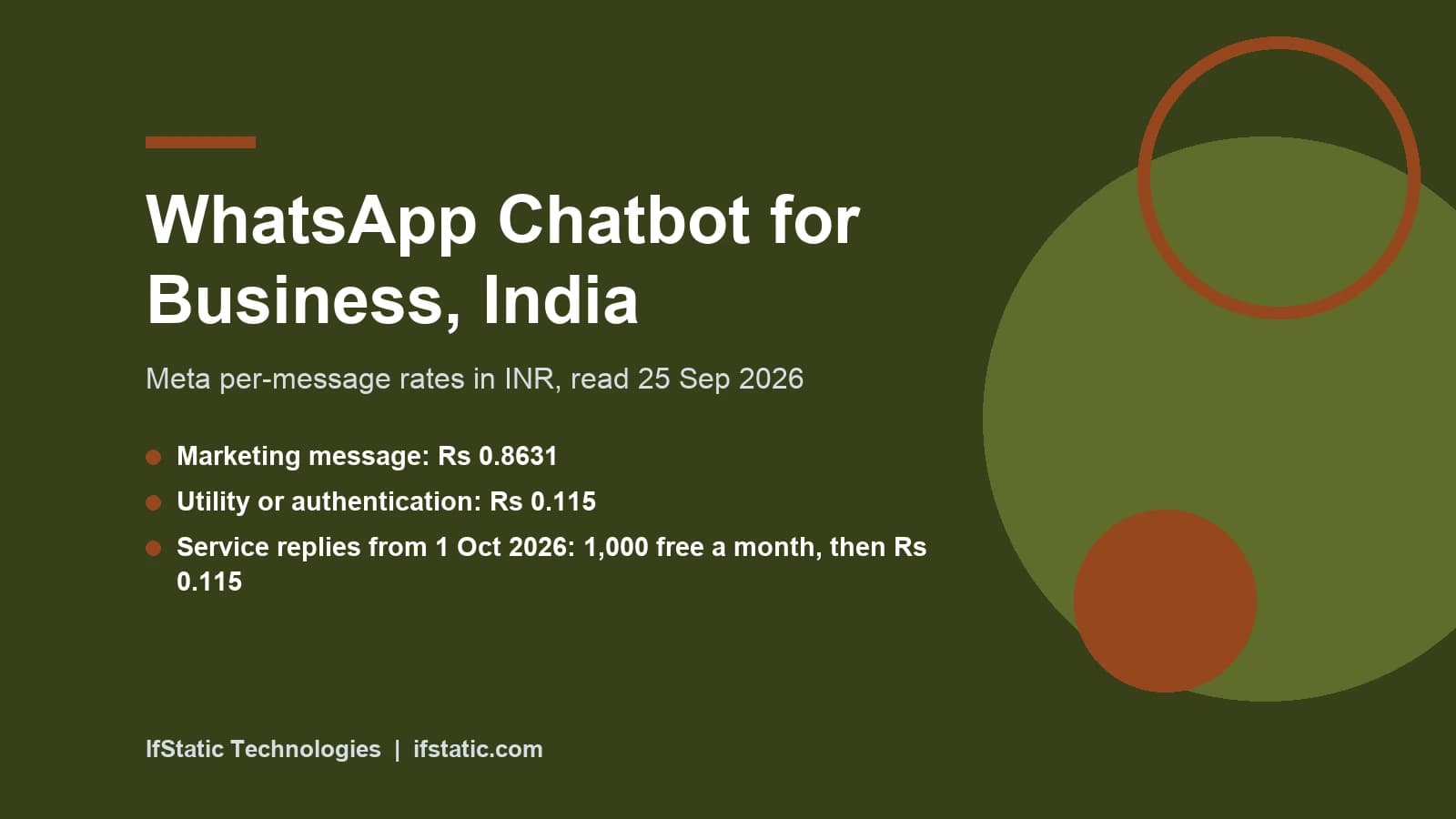
A WhatsApp chatbot for business is software that answers customers on WhatsApp, sends order and booking updates, and hands tricky chats to a person. In India it usually costs less to run than owners expect, because Meta's rates are low and the first 1,000 service replies per number each month stay free. The rules matter more than the tool, so if you want one connected to your own systems, see our AI integration services.
This guide is for Indian owners and managers planning a bot in late 2026. Prices, limits and policy come from Meta's own pages, read on 25 September 2026. You will get the India rate for each message type, what Meta's AI rule allows, real platform prices and a setup plan. If you want a bot on your site instead, read our guide to an AI chatbot for your website.
Key Takeaways
- Meta charges per delivered template message, and from 1 October 2026 it also charges for service replies after the first 1,000 per phone number each month.
- Meta's India rates are ₹0.8631 per marketing message and ₹0.115 per utility or authentication message, and its October 2026 card sets ₹0.115 per paid service message.
- Meta's terms bar AI companies from offering general-purpose assistants on WhatsApp, but a bot that serves your own customers is allowed.
- A new business portfolio can start chats with only 250 unique people in a rolling 24 hours until it verifies or builds a quality record.
- Most SMBs should start on a no-code BSP plan and move to the direct Cloud API only when volume or custom logic pays for a developer.
WhatsApp Business App vs Business Platform
WhatsApp gives businesses two routes, and picking the wrong one is the first common mistake. The WhatsApp Business app is the free phone app most shop owners already use. It suits one person or a small team replying by hand, with greeting messages, away messages and quick replies for some light automation.
The WhatsApp Business Platform is Meta's API. Your own software, or a Business Solution Provider (BSP) such as Interakt or AiSensy, sends and receives messages through it. The Cloud API is the version Meta hosts for you. A real chatbot needs this route, because only the API lets your code read each message and reply with logic.
| Point | WhatsApp Business app | Business Platform (Cloud API) |
|---|---|---|
| Who runs it | You, by hand on the phone app | Your software or a BSP dashboard |
| Chatbot logic | Greeting, away and quick replies | Full bot flows, integrations and AI |
| Message cost | Free to use | Per delivered template; service replies too from 1 Oct 2026 |
| Starting a chat | Message saved contacts by hand | Approved templates to opted-in users |
| Data links | None | Orders, bookings, CRM and payments |
| Best for | Solo shops and early testing | Growing SMBs with repeat questions |
Keep Your Number With Coexistence
Many Indian businesses worry about losing a number their customers already recognise. Meta now supports coexistence, where an existing Business app number is also connected to the Cloud API through a partner. You keep chatting on the phone app, and your bot or campaign tool works on the same number, with chat history kept in sync between the two.
There are trade-offs: Meta's documentation says broadcast lists are switched off on a coexistence number, and features such as disappearing messages stop working in one to one chats. Messages you type in the app stay free, while messages sent through the API follow API pricing. Ask your BSP whether it supports coexistence before you sign up.
Where Meta Business Agent Fits
Meta also offers Meta Business Agent, an AI agent you set up inside the Business app under Tools. Meta says it learns from your Facebook Page, past chats and website, and that you can flag topics it should avoid. Meta lists it for eligible businesses in select markets, so check the Tools menu in your own app before you plan around it.
On the Business Platform, Meta Business Agent replies are a separate message category. Meta charges for them per token from 1 August 2026.
Wrong fit for the Business app: any business that needs live order data, booking slots or payment status inside the chat. Those jobs need the API.
What a WhatsApp Chatbot for Business Costs in India
Meta changed its billing model on 1 July 2025. According to Meta's WhatsApp Business Platform pricing documentation, it now charges per delivered template message, not per 24-hour conversation. Guides that still describe the old conversation model, with a monthly allowance of free conversations, are out of date.
Every template belongs to one of three paid categories. Marketing covers offers and promotions, while utility covers updates tied to something the customer did, such as an order or a booking. Authentication covers one-time passwords. Free-form service replies, including your own bot's answers, can only be sent inside an open customer service window.
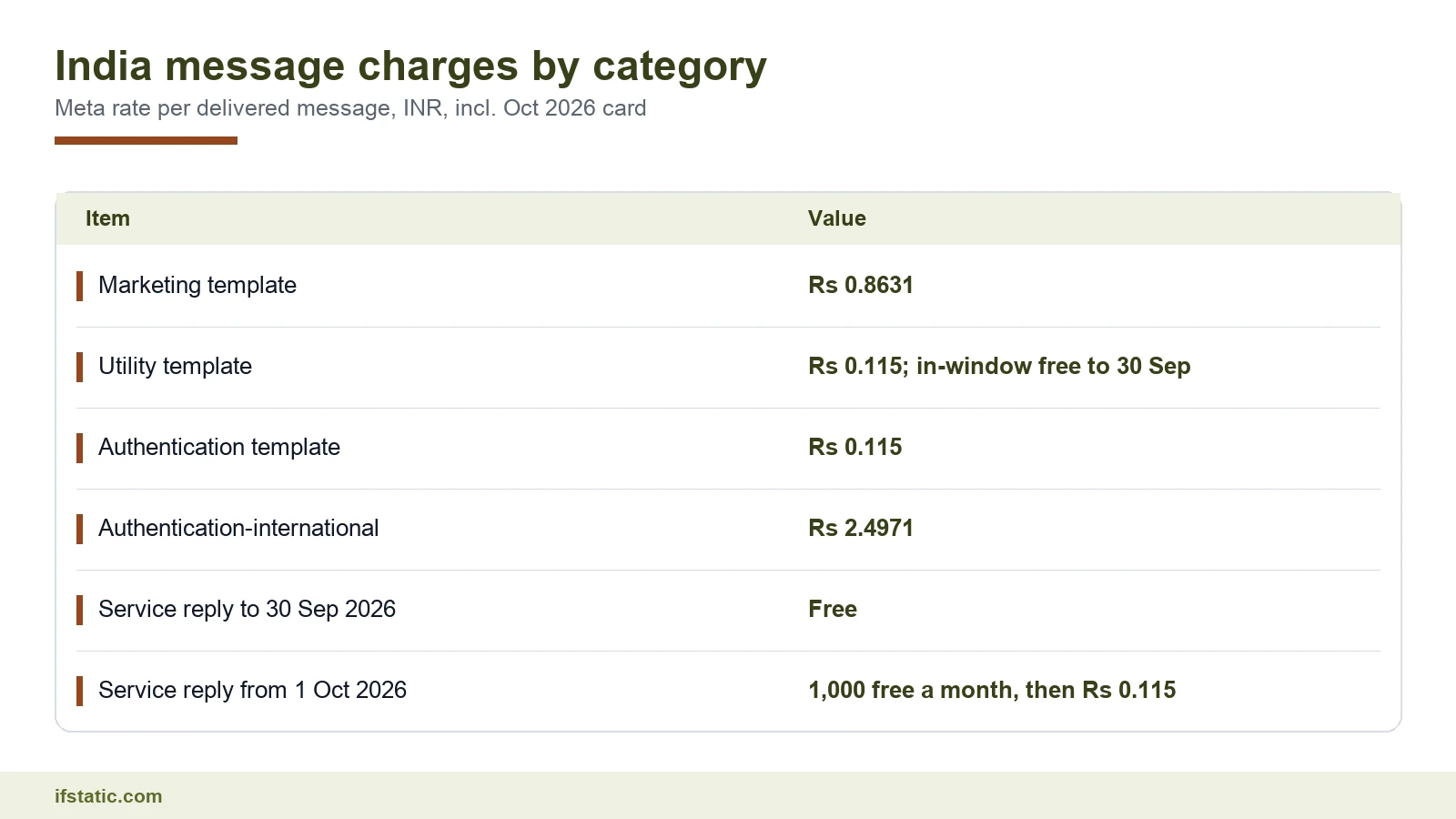
The India rates below come from Meta's own WhatsApp pricing tool, with India and INR selected, and we read them on 25 September 2026. Meta's documentation also notes a higher India marketing rate from 1 January 2026, so figures in older blog posts are likely stale.
| Message category | Meta rate per delivered message (India, INR) | When you pay |
|---|---|---|
| Marketing template | ₹0.8631 | Every time one is delivered |
| Utility template | ₹0.115 | Outside an open window; inside it too from 1 Oct 2026 |
| Authentication template | ₹0.115 | Each delivered one-time password |
| Authentication-international | ₹2.4971 | Only in the cases Meta defines for this rate |
| Service reply (free-form) | ₹0 until 30 Sep 2026; ₹0.115 from 1 Oct 2026 | From 1 Oct 2026, after the first 1,000 per phone number each month |
Meta has also published its INR rate card for 1 October 2026 on the same pricing page. It keeps the India marketing, utility and authentication rates unchanged and adds a service rate of ₹0.115, the same as utility.
Utility and authentication messages also get volume discounts. Meta's tool shows the India utility rate staying at ₹0.115 up to 25,000,000 messages a month, then falling in steps to ₹0.0805 above 300,000,000. Few SMBs ever reach the first discount step, so budget at the base rate. Check with your BSP which one-time password rate your account will pay.
The 24-Hour Window, the New Free Tier and Free Entry Points
The customer service window opens when a customer messages you, and it lasts 24 hours from their last message. Until 30 September 2026, your bot can send any non-template message in that window at no charge, and utility templates delivered inside it are free too.
That changes on 1 October 2026. Meta's pricing page says each business phone number then gets one shared free tier of 1,000 delivered service messages a month, covering one to one and group chats. After that, Meta charges for each service message, at ₹0.115 in India. Unused free messages do not roll over.
Meta has also announced charging for utility messages sent in response to users. From 1 October 2026, a utility template delivered inside an open 24-hour window is charged at the utility rate, after being free since 1 July 2025. If your account has no payment method, Meta delivers service messages within the free tier but not after it.
There is a second free route, when someone reaches you through a Click to WhatsApp ad or a Facebook Page button and you reply within 24 hours. Meta then opens a free entry point window, which stays open for 72 hours. Marketing, utility, authentication and service messages in it are all free.
- Bot replies inside the 24-hour window, until 30 September 2026.
- From 1 October 2026, the first 1,000 service replies per phone number each month.
- Utility templates sent inside an open window, until 30 September 2026 only.
- Any marketing, utility, authentication or service message in a 72-hour free entry point window.
- Messages typed by hand in the WhatsApp Business app, even on a coexistence number.
A Worked Monthly Estimate
Here is an example estimate for a dental clinic in Noida, to show how the maths works. Assume 3,000 appointment reminders a month sent as utility templates outside any open window, plus 2,000 festive offer messages sent as marketing. The bot also sends 1,500 service replies to patient questions inside the window. Those are free until 30 September 2026, but from 1 October 2026, 500 of them fall beyond the free tier.
| Line item | Direct Cloud API (Meta rate) | Interakt Growth | AiSensy with chatbot add-on |
|---|---|---|---|
| 3,000 utility reminders | 3,000 × ₹0.115 = ₹345 | 3,000 × ₹0.150 = ₹450 | 3,000 × ₹0.145 = ₹435 |
| 2,000 marketing messages | 2,000 × ₹0.8631 = ₹1,726.20 | 2,000 × ₹0.958 = ₹1,916 | 2,000 × ₹1.09 = ₹2,180 |
| 1,500 service replies | Free until 30 Sep 2026; from 1 Oct, 500 × ₹0.115 = ₹57.50 | Shown as free on 25 Sep 2026; ask its rate from 1 Oct | Shown as free on 25 Sep 2026; ask its rate from 1 Oct |
| Platform fee | ₹0 to Meta; you pay hosting and a developer | ₹2,799 a month plus taxes | ₹2,500 a month add-on, on top of a base plan |
| Estimated monthly total | ₹2,071.20 until 30 Sep 2026; ₹2,128.70 from 1 Oct 2026; plus running costs | ₹5,165 plus taxes and any service charge from 1 Oct | ₹5,115 plus the base plan and any service charge from 1 Oct |
For most SMBs the message bill stays small next to the platform fee, even after October. Both BSP pages still listed service messages as free when we read them on 25 September 2026, so ask each provider what it will charge from 1 October. Check GST on every invoice, since some BSP pages quote prices plus taxes.
The INR Billing Deadline for Indian Businesses
Meta started billing in rupees for India on 1 January 2026. This covers partners and directly integrated businesses whose Sold-To country is India. They must move every WhatsApp Business account in their portfolio to INR billing by 31 December 2026.
Meta says that from 1 January 2027 it will stop delivering messages for eligible accounts that have not moved to INR. If you run directly on the Cloud API, put this date in your calendar now. If you use a BSP, ask them to confirm in writing that they have handled it.
Opt-In, Templates, Limits and Meta's AI Policy
A bot that breaks Meta's rules gets throttled, however good its flows are. Four rules decide whether your number keeps working: opt-in, templates, messaging limits and the AI clause.
Opt-In Rules
Meta's WhatsApp Business Messaging Policy sets two conditions before you message anyone. The person must have given you their number, and you must also have their permission to send them messages or calls later. The policy adds that your opt-in must follow the law that applies to you.
- Name your business in the opt-in text, so people know who will message them.
- Say what they will get, such as order updates, reminders or offers.
- Collect opt-in where the customer acts: the checkout page, a booking form or an invoice QR code.
- Store the date, source and wording of each opt-in in your CRM.
- Honour every stop request, whether it comes on WhatsApp, by phone or in the shop.
That last point is written into the policy. You must respect requests to block or opt out made on or off WhatsApp, and remove that person from your contacts list.
Templates and the 24-Hour Window
Outside the 24-hour window, a bot can only start a chat with a pre-approved message template. You submit each template with its category, Meta reviews it, and only approved templates can be sent. Templates also carry a quality rating, and one that draws blocks and reports can be paused.
Keep utility templates plain and tied to one transaction. Mixing an offer into an order update blurs the category, and Meta prices the categories very differently. A clean template also gets fewer blocks, which protects your quality rating.
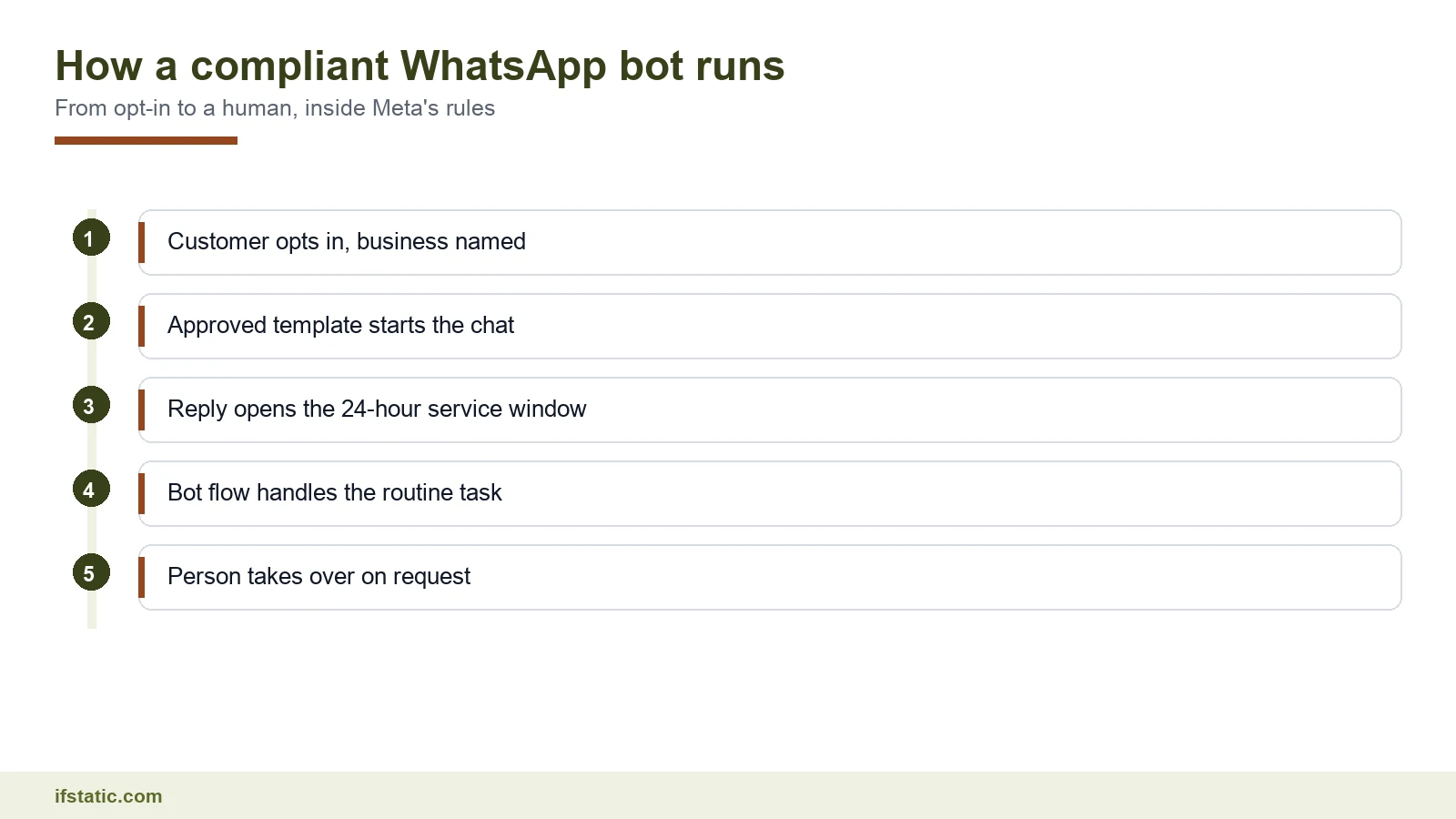
The flow above is the pattern most good bots follow. The customer opts in, a template starts the chat, and their reply opens the 24-hour service window. The bot handles the routine part, then hands the chat to a person when it should.
Messaging Limits for New Numbers
Meta caps how many unique people you can reach with business-started messages in a rolling 24 hours. Per Meta's messaging limits documentation, the cap is set for the whole business portfolio and shared by all its numbers. Replies inside a customer service window do not count.
| Limit level | Unique users per rolling 24 hours | How you reach it |
|---|---|---|
| Starting level | 250 | Default for new business portfolios |
| Second level | 2,000 | Verify your business, or deliver 2,000 high-quality templates to unique users in 30 days |
| Third level | 10,000 | Automatic if quality is high and you used half your limit in the last 7 days |
| Fourth level | 100,000 | Same rule, one level at a time |
| Top level | Unlimited | Same rule |
When you meet the criteria, Meta says the limit rises by one level within 6 hours. So a new bot cannot message your whole customer list on day one, which means you should plan a warm-up and send your most wanted messages first.
Meta's AI Policy: What Is and Is Not Allowed
This is where many 2026 guides go wrong. Section 4.7 of Meta's Terms for WhatsApp Business Platform, last modified on 23 September 2026, deals with AI providers. It covers makers of large language models, generative AI platforms and general-purpose AI assistants.
Those providers are strictly barred from using the platform to offer such technology when it is the main thing on offer, rather than incidental or ancillary. Meta decides what counts at its sole discretion, and the clause also allows an exception for businesses in certain countries, which Meta lists separately.
In plain terms, a company cannot offer a ChatGPT-style assistant to the public over WhatsApp. Your business can still use AI to answer its own customers about its products, orders and bookings, because there the AI is a tool inside a service job. The same terms let you fine-tune an AI model on your WhatsApp data only for your own exclusive use.
| Use of AI on WhatsApp | Status under the terms | Why |
|---|---|---|
| Clinic bot that answers timing and fee questions and books slots | Allowed | AI supports the clinic's own service |
| Store bot that tracks orders and suggests items from its catalogue | Allowed | AI is incidental to selling the store's goods |
| Open 'ask me anything' assistant offered as the product | Not allowed | General-purpose AI is the main function |
| AI company offering its chatbot to WhatsApp users | Not allowed | An AI provider making its technology available |
| Using WhatsApp chats to train a model you sell or share | Not allowed | Fine-tuning is allowed only for your exclusive use |
Wrong fit for WhatsApp altogether: a brand bot that chats about anything, so keep your bot's scope narrow and written down. A prompt that limits answers to your business, plus a polite refusal for off-topic questions, keeps you on the allowed side.
Use Cases That Pay Off for Indian SMBs
A WhatsApp chatbot for business earns its keep on repeat, predictable questions, so before you automate a task, check it against these four tests.
- The same question arrives many times a day from different customers.
- The answer lives in a system you already have, such as orders, bookings or stock.
- A wrong answer costs little, and a person can step in.
- Customers benefit from an immediate reply at night or on a Sunday.
Order and Delivery Updates
Order confirmations, dispatch notices and delivery alerts are utility messages at ₹0.115 each, and from 1 October 2026 that applies inside the window too. When a customer asks where their order is, the bot reads your order system and replies with a service message, free within the monthly free tier. Delivery apps such as the WaterGo delivery app in our portfolio hold exactly the order data such a bot needs.
Appointment Booking and Reminders
Clinics, salons, coaching centres and sports turfs live on bookings. A bot can show free slots, confirm a booking and send a reminder the day before. Keep the reminder a utility template with only the date, time and place, because adding a promotion turns it into a marketing message at a much higher rate.
Lead Qualification
Click to WhatsApp ads send leads straight into a chat and open the free 72-hour window. A bot can ask three or four questions, such as budget, city and timeline, then tag the lead in your CRM so hot leads go to a salesperson at once. Our guide to CRM software development covers the other side of that handoff.
Payments Through UPI
Indian customers expect to pay by UPI, and Meta's Payments API for India lets a business take payment through UPI apps, cards, netbanking and wallets from inside a chat. Deep integration works with Razorpay, PayU, BillDesk and Zaakpay. For other gateways, Meta offers a UPI intent mode, or you can send payment links.
A simple pattern works well for small shops. The bot confirms the cart, sends an order summary with a pay button or UPI link, and then sends a utility receipt once the gateway confirms payment. Staff members step in only when a payment fails twice.
Build Options: BSP No-Code, Direct Cloud API or Custom AI Bot
There are three realistic ways to build a WhatsApp chatbot for business in India. Each has a clear best fit and a clear wrong fit. We read the prices below on each provider's own pricing page on 25 September 2026.
| Option | What you pay | Chatbot capability | Best for |
|---|---|---|---|
| Interakt Growth (BSP) | ₹2,799 a month plus taxes; marketing ₹0.958, utility ₹0.150, authentication ₹0.128 per message | FAQ automations and linear chatbot flows | Shops starting with campaigns and simple bots |
| Interakt Advanced (BSP) | ₹3,799 a month plus taxes | Branching flows with API calls and conditions | Teams linking bots to order or booking systems |
| AiSensy chatbot builder (BSP add-on) | ₹2,500 a month for 5 chatbots, or ₹2,250 a month billed yearly; marketing ₹1.09, utility and authentication ₹0.145 | Drag-and-drop flows started by keywords, templates, QR codes and ads | Owners who want to build flows themselves |
| AiSensy AI Agent Builder (BSP add-on) | ₹1,350 a month with 1,000 AI messages | Question answering from a knowledge base | Testing AI answers without a developer |
| Direct Cloud API | Meta rates only, plus hosting and developer time | Anything you code | High volume or unusual logic |
| Custom AI bot on the Cloud API | Meta rates, hosting, AI model usage and a build project | Structured flows plus AI answers from your own data | SMBs whose systems a BSP cannot reach |
BSP No-Code Platforms
A BSP gives you the API number, a shared team inbox, a template manager and a flow builder in one login. You can go live without writing code, but you pay a monthly fee and a per-message rate above Meta's own.
Interakt's pricing page lists "no templates markups" only on its Enterprise plan, which tells you the lower plans carry one. AiSensy's pricing page sells its chatbot builder and AI agent as add-ons, charged on top of a base plan.
Wrong fit: businesses whose bot must read live data from a custom system the BSP cannot connect to, or whose volume makes the markup cost more than a developer.
Direct Cloud API
With the Cloud API you create a Meta app, connect a WhatsApp Business account and point webhooks at your own server. You pay Meta's rates with no BSP margin. You also own everything else: the inbox, template management, uptime, security and the move to INR billing before 31 December 2026.
Wrong fit: a team without a developer on call, because when a webhook fails at night nobody else will fix it.
Custom Bot With AI
The third option joins the Cloud API to a structured flow engine and an AI model for free-text questions. OpenAI models, Dialogflow, Make.com or Zapier can sit in the middle, reading from your CRM, booking or order database. This is the kind of work our custom software development team handles alongside AI integration.
Design it so the structured flow does most of the work, while AI answers free-text questions from your own content and hands over when it is unsure. That keeps costs predictable and keeps you well inside Meta's AI clause.
Wrong fit: a business that gets only a handful of chats a day. A BSP flow does the same job for a fixed monthly fee.
How to Set Up a WhatsApp Chatbot for Business
The steps below assume a BSP or a developer handles the API connection, and the order matters more than the tool you pick.
- Pick one job for version one, such as order status or bookings, and write down what the bot will not do.
- Choose the number. Use a fresh number for the API, or ask your BSP about coexistence to keep your Business app number.
- Verify your business with Meta. It lifts your starting limit from 250 to 2,000 unique users per rolling 24 hours.
- Add a payment method to your WhatsApp Business account, or service replies stop once the free tier is used from 1 October 2026.
- Set a display name and business profile that match your brand and website.
- Write and submit templates for each category you need, and keep offers out of utility templates.
- Build the flow: greeting, menu buttons, the main task, a fallback, and a talk-to-a-person option on every menu.
- Connect your data: the order system, calendar or CRM, plus a payment gateway if you collect money by UPI.
- Add AI only for free-text questions, and limit it to your own business content.
- Test with your team on real phones, then launch to a small opted-in group before a wider send.
- Review quality ratings, block rates and handoff counts every week, and fix the flows that fail.
Booking bots need solid slot logic behind them. The BookMyPlay futsal booking app in our portfolio shows the kind of availability rules a booking flow has to respect.
Mistakes That Get Numbers Restricted
Meta's policy says it may limit or remove your access, or your ability to send messages, if you get a lot of negative feedback or break its terms. These habits usually cause it.
- Messaging bought or scraped lists that never opted in, so people block and report you.
- Sending offers to your whole list from a new number instead of warming up within the 250-user limit.
- Hiding offers inside utility templates, which blurs categories and annoys customers.
- Ignoring stop requests, or making people repeat them.
- Building bots with no way out to a person, phone line, email or support form.
- Offering an open AI assistant that answers anything, which falls under the AI provider clause.
- Letting the INR billing deadline pass if you run directly on the Cloud API.
- Having no payment method on file, so service replies stop once the monthly free tier runs out.
The escalation rule deserves a closer look: the policy allows automation inside the 24-hour window, but you must also offer prompt, clear and direct ways to reach help. A talk-to-a-person button on every menu meets that rule and often saves a sale.
Conclusion
A WhatsApp chatbot for business is worth building in 2026 when it does a narrow job well and follows Meta's rules. Message fees in India are low, and even after 1 October 2026 the first 1,000 service replies per number each month are free. The real costs sit in the platform, the integrations and the discipline to collect opt-in properly. If you want help scoping one, talk to IfStatic for a quote.
Start small: launch one flow, measure how many chats it closes without a person, and expand only after your quality rating holds steady. Recheck Meta's rate card every quarter, because the India marketing rate has already changed once this year and service charges begin on 1 October 2026.
Frequently Asked Questions
Is a WhatsApp chatbot for business free in India?
Partly. Until 30 September 2026, replies your bot sends inside the 24-hour window are free, and so are utility templates sent in it. From 1 October 2026, each phone number gets 1,000 free service messages a month, then Meta charges ₹0.115 each in India, and utility replies are charged too. Marketing costs ₹0.8631 per message. BSPs add their own fees.
Can I use ChatGPT inside my WhatsApp business bot?
Yes, if the AI serves your own customers about your own business. Meta's terms bar AI providers from offering general-purpose assistants as the main function on the WhatsApp Business Platform. A bot that uses an AI model to answer questions about your products, orders or bookings is incidental use. Keep answers limited to your business and refuse off-topic requests.
Can I keep my existing WhatsApp Business app number?
Often, yes. Meta supports coexistence, where the same number works in the Business app and on the Cloud API through a partner. Chat history syncs between the two, and messages you send from the app stay free. Some features, including broadcast lists, are switched off. Ask your BSP whether it supports coexistence before you migrate.
How many people can my WhatsApp bot message in a day?
A new business portfolio can start chats with 250 unique users in a rolling 24 hours. Verifying your business, or delivering 2,000 high-quality templates in 30 days, lifts that to 2,000. After that, Meta raises the limit to 10,000, 100,000 and then unlimited if quality stays high. Replies inside the service window do not count.
How long does it take to launch a WhatsApp bot?
A simple BSP flow for questions or order updates can go live soon after your business is verified and your templates are approved. A custom bot that reads from your order, booking or CRM systems takes longer, because each link needs building and testing. Plan the warm-up too, since a new number starts with a 250-user limit.
What happens if my WhatsApp number gets restricted?
Meta may limit your messaging or remove access if you get a lot of negative feedback or break its policies. Stop all marketing sends, review which templates drew blocks, and fix your opt-in process. Check your quality rating and account status in WhatsApp Manager. Repeated violations can lead to a permanent ban, so act on the first warning.
Sources, Method and Author
We reviewed the Google India top 10 for this keyword on 25 September 2026 and read six ranking pages in full. Prices, limits and policy come from Meta's developer docs, pricing tool, October 2026 INR rate card, messaging policy and platform terms. BSP prices come from the Interakt and AiSensy pricing pages. We could not read AiSensy's base plan prices or confirm whether Meta Business Agent is live in India.
About the author: Aman Raj is a Director and Website Designer at IfStatic Technologies in Greater Noida West. He works on the design, build and launch of websites and apps for IfStatic clients and writes the company's guides on planning digital projects.