
AI Chatbot for Website: Types, Real Costs and a Safe Setup Plan
An AI chatbot for website visitors answers questions in natural language, using information from your own pages, and transfers the conversation to a human agent when it is unsure. For most Indian businesses, the practical choice is between subscribing to a ready-made widget and developing on a model API. Our AI integration team delivers both, and this guide explains the trade-offs using prices checked on 25 September 2026.
This guide covers the four chatbot categories, prices from vendor pages, a worked token calculation, a step-by-step launch plan and the controls that stop a chatbot from inventing answers. It also maps India's DPDP Rules to chat transcripts. Finally, it lists the situations where a chatbot does more damage than good. Every price comes from the vendor's official page, and every estimate states its assumptions.
Key Takeaways
- A retrieval-augmented (RAG) chatbot that answers only from your approved content, with a quick transfer to a human agent, is the safest default for most business websites.
- Ready-made platforms start low: Zoho SalesIQ lists its Basic plan at ₹350 per operator a month billed annually, plus GST and separate AI provider charges.
- Model tokens are rarely the major expense: in our worked example of 10,000 replies a month, the bill is $4.50 on gpt-6-luna and $90 on gpt-6-sol.
- A Canadian tribunal held Air Canada liable for its chatbot's incorrect answer, so treat every chatbot reply as your company speaking officially.
- India's DPDP Rules were notified on 14 November 2025 with an 18-month phased window, so plan consent, retention and deletion for chat transcripts immediately.
Four Types Of Website Chatbot And What Each Does Well
Not every chatbot is an AI chatbot. The word covers four very different designs, and the category you choose decides your cost, your risk and how much maintenance the chatbot needs every month.
Rule-based chatbots follow a decision tree that you design. LLM chatbots send the question to a large language model and return whatever it generates. Retrieval-augmented chatbots, usually called RAG, first search your own content and instruct the model to answer only from what they retrieved. Hybrid chatbots combine a button menu with RAG answers and a clear route to a human agent.
| Type | How it answers | Good for | Main risk |
|---|---|---|---|
| Rule-based | Fixed menus and scripted replies | Order status, bookings, lead forms | Feels rigid and fails on any question outside the tree |
| LLM only | The model writes a reply from its general training | Drafting, casual chat, internal tools | Confident wrong answers about your prices and policies |
| RAG | Searches your pages first, then the model answers from them | FAQs, product and policy questions | Only as good as the content you feed it |
| Hybrid with handoff | Menus for fixed tasks, RAG for questions, a person for the rest | Most business websites | Needs staff who answer handoffs quickly |
For a business website, the hybrid pattern is usually the sensible starting point. Buttons handle tasks with one correct path, such as booking a demo. RAG handles open questions about your services and policies. A human agent handles anything involving money, health, legal terms or an unhappy customer.
How A RAG Chatbot Answers A Question
RAG is the component that makes an AI chatbot for website support reliable enough to launch. The chatbot never answers from memory alone. It retrieves your approved content, passes the most relevant matches to the model, and instructs the model to use nothing else.
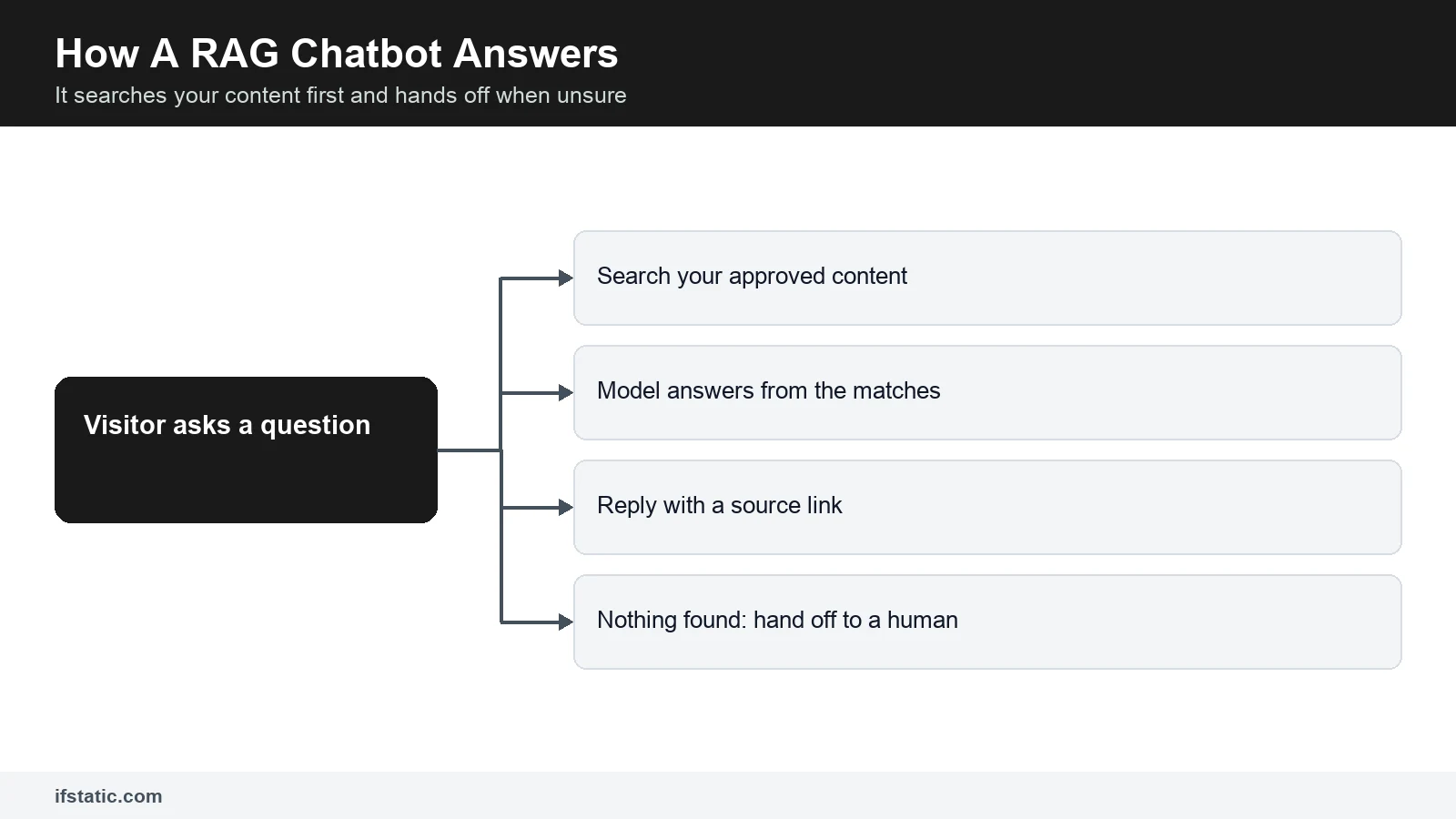
- The visitor types a question, for example: do you deliver to Greater Noida West?
- The system converts the question into a search query and retrieves the three to five most relevant sections of your content.
- The model receives the question, those sections and your instructions, such as answer only from the context provided.
- If the retrieved sections contain the answer, the chatbot replies and links the source page.
- If nothing relevant appears, or the topic is on your escalation list, the chatbot offers a human agent instead of guessing.
That final step matters most. A chatbot that admits uncertainty and offers a human agent loses nothing. A chatbot that invents a refund policy can cost you actual money, as the Air Canada decision described below demonstrates.
AI Chatbot For Website Cost: Build Vs Buy With Real Prices
Vendors price chatbots in three different ways, which makes quotations difficult to compare. Some charge per operator or seat. Some charge per AI conversation that resolves a problem. Model APIs charge per token, a small unit of text. The table uses list prices shown on each vendor's page on 25 September 2026. Taxes are additional, and prices change frequently.
| Option | Listed price | What you get | Watch for |
|---|---|---|---|
| Zoho SalesIQ Basic | ₹350 per operator a month, billed annually | 1 chatbot, 25K bot chat sessions a month | Answer Bot runs on your own AI key (BYOK), billed by that provider; GST extra |
| Zoho SalesIQ Professional | ₹750 per operator a month, billed annually | 5 chatbots, 50K bot chat sessions a month | Extra chatbot or 5K sessions listed at ₹400 a month each, billed annually |
| ChatBot.com Essential | $19 per user a month billed yearly, $25 monthly | 1 AI agent, 10 AI resolutions a month | Extra AI resolutions at $0.99 each or $49.50 per 50 |
| Intercom with Fin | $0.99 per Fin outcome, plus seats from $19 | AI agent inside a full helpdesk | An outcome can include a workflow that ends in a handoff |
| OpenAI API, custom build | Per token, from $0.10 per 1M input tokens on gpt-6-luna | The model only | You build the widget, search, rules and logs |
Check the billing unit before you compare. Zoho SalesIQ's pricing page lists rupee prices per operator, so two support executives on Basic pay ₹700 a month before GST and AI provider charges. The ChatBot.com pricing page limits AI resolutions on every plan, and its entry plan includes only 10.
Intercom's pricing page charges $0.99 per Fin outcome. It counts an outcome when a customer confirms the issue is resolved, requests nothing further after Fin replies, or when Fin completes a workflow, handoffs included. At 1,000 outcomes a month, that means $990 before seat charges.
What The Model Tokens Cost: A Worked Example
If you develop your own chatbot, the model bill is usually smaller than businesses expect. Assume 2,000 conversations a month with five visitor messages each, which equals 10,000 model calls. Assume each call sends about 3,000 input tokens, covering your instructions, the retrieved content and recent messages, and receives about 300 tokens back.
That totals 30 million input tokens and 3 million output tokens every month. The prices below are standard short-context rates from OpenAI's API pricing page, checked on 25 September 2026. Your traffic will differ, so treat this calculation as a method, not a quotation.
| Model or tool | Input per 1M tokens | Output per 1M tokens | Monthly cost in this example |
|---|---|---|---|
| gpt-6-luna | $0.10 | $0.50 | $3.00 + $1.50 = $4.50 |
| gpt-5.4-mini | $0.75 | $4.50 | $22.50 + $13.50 = $36.00 |
| gpt-6-sol | $2.00 | $10.00 | $60.00 + $30.00 = $90.00 |
| OpenAI file search tool (optional) | $2.50 per 1,000 calls | - | 10,000 calls = $25.00; storage free up to 1 GB |
Converting your website into searchable data is even cheaper. OpenAI lists text-embedding-3-small at $0.02 per 1M tokens. A 500-page website at roughly 800 tokens a page equals 400,000 tokens, which costs under one cent to process.
So the smaller model is inexpensive enough to ignore, and the larger model stays under $100 a month at this volume. API invoices arrive in US dollars, so your rupee cost moves with the exchange rate. The significant money goes into development, testing and keeping the content current.
Development cost is where quotations vary most. As an illustration only, assume a custom API and RAG project takes 150 to 300 developer hours. At ₹1,200 to ₹2,000 an hour, the development cost lands between ₹1.8 lakh (₹180,000) and ₹6 lakh (₹600,000). Ask any software development partner for an hour-by-hour estimate before you compare totals.
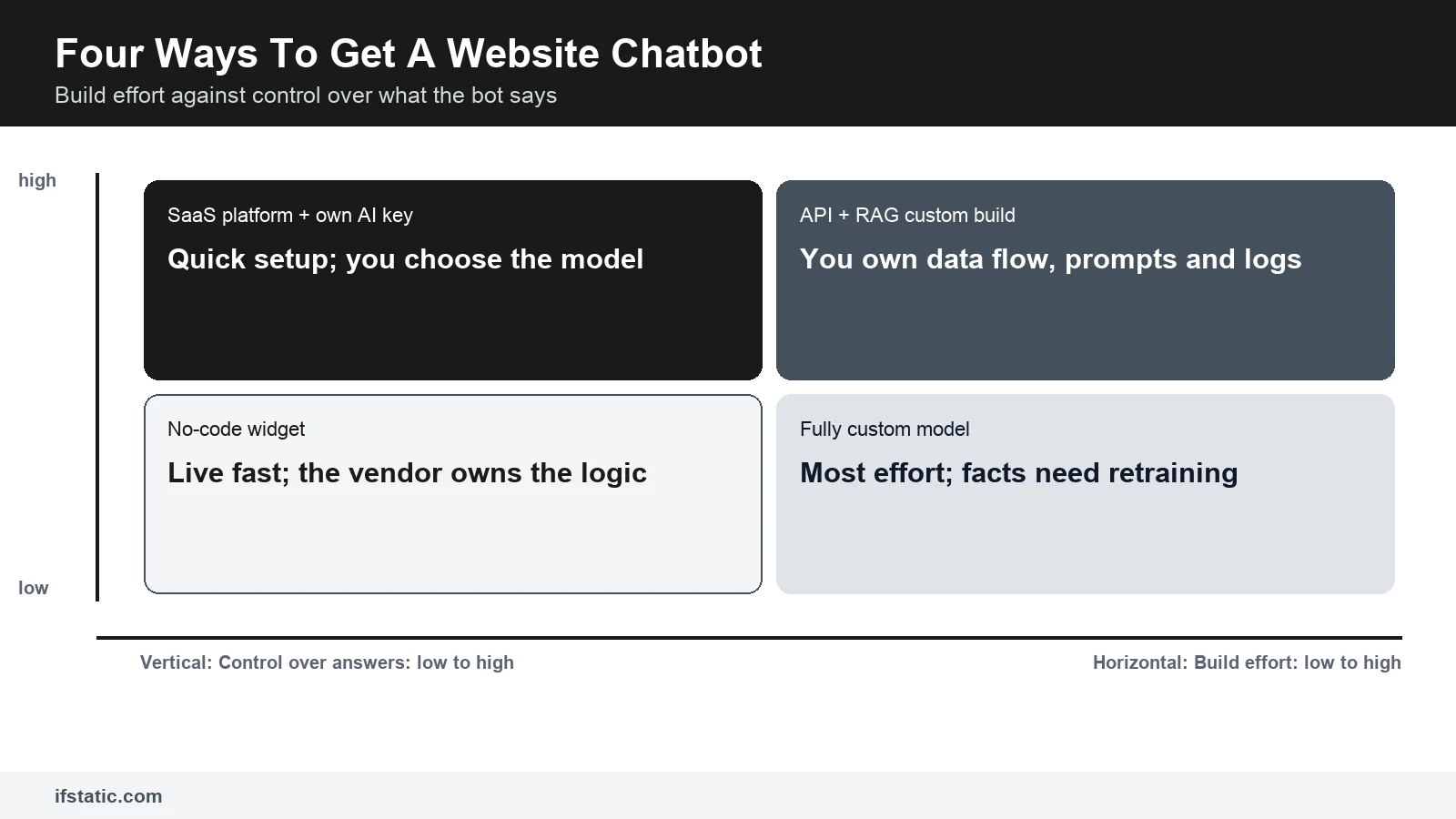
Plot the four routes on effort and control, and the decision becomes clearer. A no-code widget is fast, but the vendor controls the logic. A SaaS platform with your own AI key gives you more influence over the model. An API and RAG project gives you complete control over data flow, prompts and conversation logs.
Training a fully custom model requires the most effort and delivers less control than people assume. Facts learned during training can only be changed by training again, so a new price list means another training cycle. With RAG, you simply edit one document.
Wrong Fit Verdicts For Each Route
- No-code widget. Wrong fit: businesses that must keep conversation data inside their own systems, or connect the chatbot to a custom order database.
- SaaS platform with your own AI key. Wrong fit: teams with nobody to monitor the monthly AI invoice and the resolution or session limits.
- API plus RAG custom build. Wrong fit: a low-traffic website where a contact form already copes and no developer is available to maintain the chatbot.
- Fully custom model. Wrong fit: almost every small business website, because RAG on a hosted model answers the same questions with far less effort.
A Step-By-Step Plan To Launch An AI Chatbot For Website Support
Most failed chatbots fail before anyone writes a line of code. Nobody decided what the chatbot should do, or nobody owns its content. This plan works whether you purchase a platform or develop your own.
- Choose three to five use cases from your actual inbox, call records and chats, such as delivery areas, service packages or appointments.
- Write the escalation list: topics the chatbot must always transfer to a human agent, such as refunds, complaints, medical or legal questions.
- Prepare the knowledge base: current FAQs, policies, price lists and service pages, with one owner for every document.
- Write the instructions: the chatbot's role, its tone, the topics it must avoid, and a fixed response for when it does not know.
- Configure the handoff to WhatsApp, a phone call or email, with the conversation history attached.
- Connect analytics and your CRM so every lead and every handoff is recorded automatically.
- Test with at least 100 genuine questions before launch, including rude, irrelevant and tricky ones.
- Launch on a few pages first, review transcripts every week, and correct the content behind each inaccurate answer.
Prepare The Knowledge Base Before You Choose A Platform
The chatbot can only be as current as your content. Outdated PDFs, three versions of a price list and an old blog post will all be treated as accurate information. Organise them first, because no platform can repair what you feed it.
- Keep one current version of every policy, and archive the older copies.
- Divide long pages into short sections with descriptive headings, so the search retrieves the correct section.
- Write simple answers to the 20 questions your team receives most frequently.
- Add a last-reviewed date and a named owner to every document.
- Keep private information out: no customer lists, salary sheets or internal notes in the chatbot's sources.
Plan The Handoff To WhatsApp, Phone Or Email
The handoff is where a chatbot either wins a customer or loses one. Offer it early, not after five unsuccessful replies. Pass the transcript along so nobody repeats themselves. Display your working hours, and outside them, collect a callback number with clear consent.
If your customers already message you on WhatsApp, a click-to-chat handoff lets them continue the conversation there. That channel has its own rules and costs, which our guide to a WhatsApp chatbot for business explains. For sales enquiries, push the name, requirement and transcript directly into your pipeline, where a custom CRM can score and route them.
Phone handoffs work best as a click-to-call button that appears during office hours. Email handoffs should create a ticket or a CRM task, not land in a shared inbox that nobody monitors. Whatever the channel, send the customer a short message explaining who will respond and approximately when.
How To Control Accuracy, Hallucination And Misuse
A hallucination is a confident answer the model invented. It is the biggest risk in any AI chatbot for website use, because visitors treat the chatbot as your official voice. Courts and tribunals tend to agree with them.
The best-known example is Moffatt v. Air Canada, decided on 14 February 2024 by British Columbia's Civil Resolution Tribunal. The airline's website chatbot told a customer that a bereavement fare could be claimed after booking, which was incorrect. Air Canada argued that the chatbot was responsible for its own actions, and the tribunal rejected that argument.
The tribunal awarded CAD 650.88 in damages. It held that a company is responsible for all information on its website, whether it comes from a static page or a chatbot. An Indian court may reason differently, but the lesson travels well: take reasonable care that the chatbot is accurate, or do not allow it to answer.
The second risk is deliberate misuse. The OWASP entry on prompt injection ranks it first in the 2025 list of risks for LLM applications. It states that it is unclear whether any fool-proof prevention exists. One of its examples is a support chatbot manipulated into ignoring its instructions and accessing private data.
So restrict what the chatbot can access, not only what it is instructed to do. These controls cover most of the risk for a business website:
- Ground every answer: reply only from retrieved content, and display the source link under the reply.
- Define a refusal response: when the search finds nothing relevant, the chatbot says so and offers a human agent.
- Keep money out of generated text: prices, discounts and refunds come from your database or a fixed page.
- Give the chatbot the minimum access it needs, and let your own code verify any request that touches customer records.
- Require human approval for risky actions, such as refunds, cancellations or account changes.
- Filter input and output for phone numbers, card numbers, abusive language and irrelevant requests.
- Test adversarially before launch: try to make the chatbot ignore its instructions, reveal its prompt or promise a discount.
- Review a sample of transcripts every week, and correct the source content, not only the prompt.
Test grounding, not fluency. OWASP suggests three checks for every RAG answer: was the retrieved content relevant, is the answer based on it, and does it address the question asked.
Data Protection For Chatbots Under India's DPDP Act 2023
A website chatbot collects personal data the moment a visitor types a name, phone number or order ID. Under the Digital Personal Data Protection Act, 2023, your business is the Data Fiduciary for that information. Your chatbot vendor and model provider act as Data Processors on your behalf.
The government's DPDP Rules backgrounder says the Rules were notified on 14 November 2025, with an 18-month phased compliance period. By simple date arithmetic, that window runs to about May 2027. A chatbot you launch today will still be operating then, so design for the Rules immediately.
| DPDP requirement | What it means for your chatbot |
|---|---|
| Separate, clear consent notice that explains the specific purpose | Show a short notice before the bot asks for a name or number, and link your privacy notice |
| Purpose limitation and data minimisation | Ask only for what the handoff needs, and do not reuse transcripts for ads without saying so |
| Storage limitation | Set a retention period for transcripts and delete them on schedule, including at the vendor |
| Reasonable security safeguards | Restrict transcript access, mask phone and card numbers, and sign processor terms with vendors |
| Tell affected people about a breach without delay, in plain language | Know where chat logs live so you can tell who was affected |
| Answer access, correction and erasure requests within 90 days | Be able to find and delete one person's chats by phone number or email |
| Verifiable consent before processing children's data | Education and children's brands need an age check before collecting details |
| Visible contact for a designated officer or DPO | Put that contact in the chat footer or privacy notice |
The penalties are large enough to take seriously. The same backgrounder says failing to maintain reasonable security safeguards can attract up to ₹250 crore. Failing to report a breach, or violating the duties on children's data, can attract up to ₹200 crore each. Other violations can attract up to ₹50 crore.
The processing location also matters. OpenAI's pricing page lists a 10% uplift for regional processing endpoints on eligible newer models, so data residency carries a price. Ask every vendor where transcripts are stored, for how long, and whether they are used to train models.
This is a practical summary, not legal advice. If your chatbot handles health, financial or children's data, ask a lawyer to review the consent text and your vendor contracts before launch.
Metrics To Track And When A Chatbot Is The Wrong Fit
Conversation volume alone tells you nothing. Track whether the chatbot resolved problems, whether its answers were accurate, and whether it supported sales or customer service. Configure these measurements in your analytics before launch, so you have a baseline for comparison.
| Metric | How to measure it | What a bad number tells you |
|---|---|---|
| Containment rate | Chats closed without a handoff, checked against repeat contacts | The bot deflects people who then call anyway |
| Answer accuracy | Weekly review of sample transcripts against your sources | Content is stale or search pulls the wrong page |
| Handoff time | Minutes from a handoff request to a human reply | Nobody is watching the queue |
| Lead capture | Chats that end with a consented name and number in the CRM | The bot answers but never asks for the next step |
| Unanswered questions | Chats where search found nothing relevant | Gaps in your knowledge base to fill |
| Cost per resolved chat | Monthly tool and API spend divided by resolved chats | A plan or model that no longer suits your volume |
| Visitor rating | Thumbs up or down after each answer | Problems with tone, length or accuracy |
Review these numbers monthly, alongside the transcripts behind them. A high containment rate with a low rating usually means the chatbot is closing conversations it should have transferred.
When A Chatbot Creates More Problems Than It Solves
Sometimes the honest answer is no chatbot, or not yet. These are the situations where we would tell a client that a chatbot is the wrong fit for now:
- Wrong fit: websites with very few enquiries, where a clear contact form and a WhatsApp button are quicker to set up and easier to manage.
- Wrong fit: businesses with outdated or scattered content, because the chatbot will repeat the confusion at scale.
- High-stakes advice, such as medical diagnosis, legal opinions or investment recommendations, where one incorrect answer causes genuine harm.
- Teams that cannot answer handoffs during working hours, since a chatbot that promises a human agent and delivers nobody damages trust.
- Sales that depend on a personal relationship, where buyers expect to speak with the founder, not a widget.
- Slow websites, because a heavy chat script can reduce page speed even further.
If speed is the concern, load the chat script only after the page has rendered, and measure page speed before and after installation. A lean build from a website development team leaves room for the widget without slowing your visitors down.
Conclusion
Start small and grounded. Choose a few questions your team answers every day, give the chatbot clean content, and provide an honest way to transfer the conversation to a human agent. For most businesses, a hybrid RAG chatbot with a quick handoff performs better than a clever chatbot that guesses.
If you want help choosing between a SaaS platform and a custom build, talk to IfStatic about your requirements. We can map the use cases, review your content, plan the integration and configure the metrics above, and you decide which route suits your budget.
Frequently Asked Questions
How much does an AI chatbot for website use cost in India?
Ready-made platforms start low. Zoho SalesIQ lists its Basic plan at ₹350 per operator a month billed annually, plus GST and separate AI provider charges. Intercom charges $0.99 per Fin outcome plus seats. A custom build adds developer time, while the model bill can be small: our worked example of 10,000 replies a month came to $4.50 on gpt-6-luna and $90 on gpt-6-sol.
What is a RAG chatbot?
RAG stands for retrieval-augmented generation. The chatbot first searches your approved content, such as FAQs, policies and service pages. It then passes the most relevant matches to a language model with an instruction to answer only from them. If nothing relevant appears, a well-built RAG chatbot says so and offers a human agent instead of guessing, which keeps answers tied to your own information.
Can a website chatbot give wrong answers?
Yes. Language models can produce confident answers that are not true, which is called hallucination. In Moffatt v. Air Canada, a tribunal held the airline liable for its chatbot's incorrect fare advice. Reduce the risk by answering only from retrieved content, displaying source links, keeping prices out of generated text, transferring to a human agent when unsure and reviewing transcripts every week.
Does India's DPDP Act apply to website chatbots?
Yes, if the chatbot collects personal data such as names, phone numbers or order details. Your business is the Data Fiduciary. The DPDP Rules were notified on 14 November 2025 with an 18-month phased window. Plan a clear consent notice, a retention period for transcripts, security safeguards and a way to answer access or erasure requests within 90 days.
Should I purchase a chatbot platform or develop a custom one?
Purchase when your questions are standard, your volume is modest and the platform connects to the software you already use. Develop when you need your own data flow, deep integration with order or booking systems, strict control over logs, or when per-resolution fees would grow large at your volume. Many businesses start with a platform and move to a custom build later.
Which metrics show whether a website chatbot is working?
Track containment rate, answer accuracy from weekly transcript reviews, time to a human reply after handoff, consented leads in your CRM, unanswered questions, cost per resolved chat and visitor ratings. Read the numbers alongside the transcripts. A high containment rate with poor ratings often means the chatbot is closing conversations it should have transferred to a human agent.
Sources, Method and Author
How this guide was researched: we read the Google India top 10 for 'AI chatbot for website' on 25 September 2026 and six ranking pages in full. That day we opened the Zoho SalesIQ, ChatBot.com, Intercom and OpenAI pricing pages, the PIB DPDP Rules backgrounder, OWASP's prompt injection entry and the Moffatt v. Air Canada decision. We could not verify typical Indian build rates, so that figure is an illustration.
About the author: Aman Raj is a Director and Website Designer at IfStatic Technologies in Greater Noida West. He works on the design, build and launch of websites and apps for IfStatic clients and writes the company's guides on planning digital projects.