
CRM Software Development in India: Build or Buy? A 2026 Guide
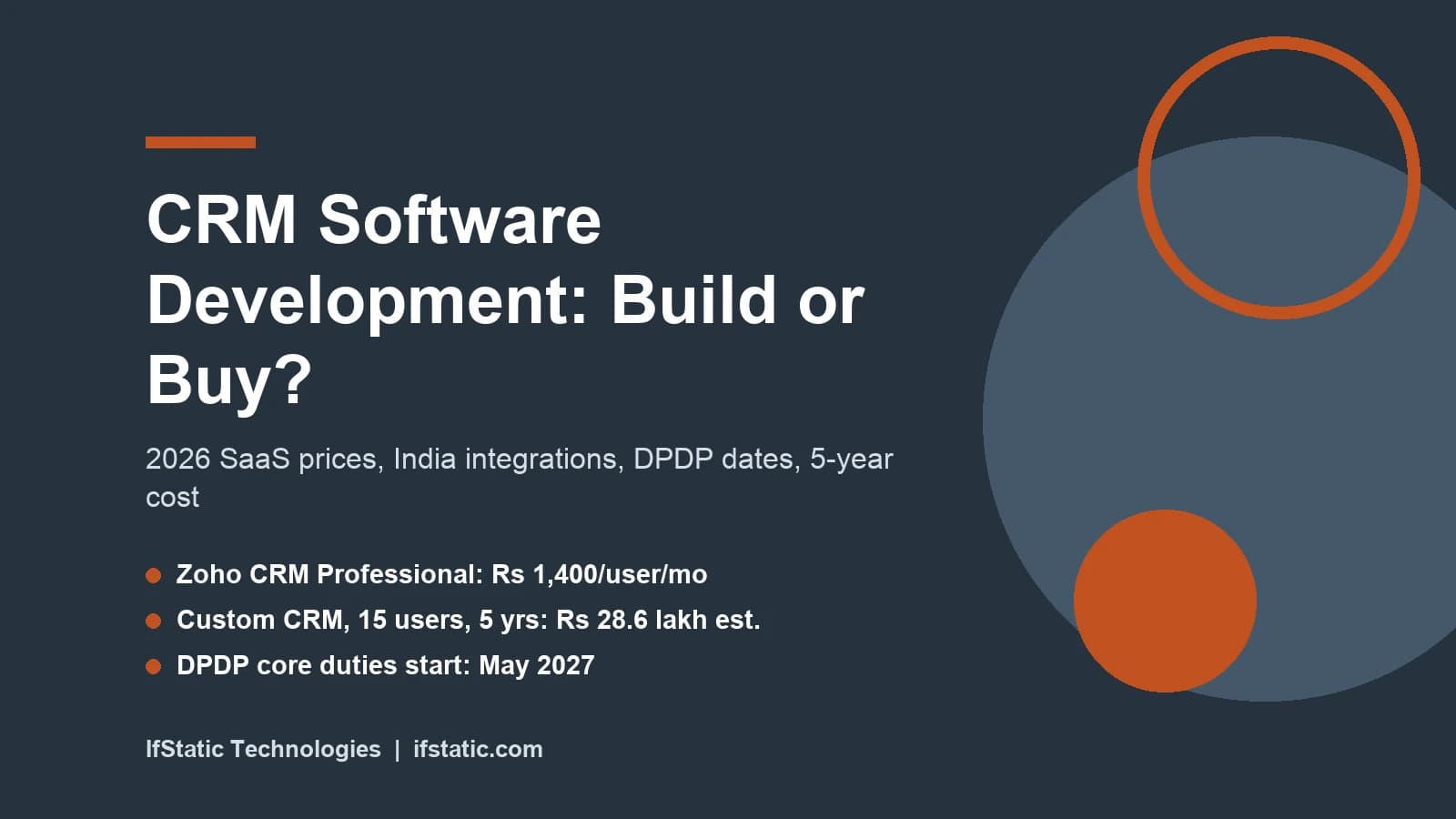
CRM software development means building a customer system around your own sales process, instead of renting a standard one per user. For most Indian SMBs with a small team, a subscription such as Zoho CRM costs less over five years. A custom build, the kind covered by IfStatic's software development service, pays off as the team grows or when rented tools cannot connect your leads, invoices and chats.
This guide gives you the numbers to decide either way, with every price dated. We opened the pricing pages of Zoho CRM, HubSpot and Salesforce on 25 September 2026. We also read the WhatsApp and IndiaMART developer documents and the DPDP Rules on the MeitY website. Where a figure is our own estimate, we say so and show the working.
Key Takeaways
- On 25 September 2026, Zoho CRM's India page listed ₹800 to ₹2,600 per user per month on annual billing, while HubSpot and Salesforce priced in US dollars.
- For a 15-user team over five years, our model puts Zoho CRM Professional near ₹14 lakh, a custom CRM near ₹29 lakh, and HubSpot or Salesforce above ₹80 lakh.
- India-specific work, such as IndiaMART's API limits, JustDial webhooks, Tally sync and WhatsApp templates, is where CRM software development earns its cost.
- Most DPDP duties on consent, security and breach reporting start around May 2027, so a CRM you start today should ship with them built in.
- Custom CRM is the wrong fit for small teams on a standard sales funnel, and for any business without a person to own the system after launch.
CRM Software Development vs a SaaS Subscription
The first question is not how to build a CRM, but whether your business should build one at all. A SaaS CRM works on day one, receives updates you never pay for directly, and usually comes with mobile apps and support. The catch is the meter, because you pay for every user, every month, for as long as the business operates.
A custom CRM flips that shape: you pay a large sum up front, then smaller amounts for hosting and upkeep. You own the code, the data model and the product roadmap, but you also own every bug, every security patch and every feature request. Neither shape is better in general, and the right one depends on team size, how unusual your process is, and how many Indian tools you need to connect.
What Zoho, HubSpot and Salesforce Charge (Read 25 September 2026)
Zoho is the usual benchmark for Indian SMBs because it prices in rupees. The Zoho CRM pricing page, viewed from India, listed four paid editions on annual billing. Standard cost ₹800, Professional ₹1,400, Enterprise ₹2,400 and Ultimate ₹2,600 per user per month, with GST charged on top. A free edition is also available for businesses with up to three users.
HubSpot showed its prices in US dollars. On its Sales Hub pricing page, Starter was $7 per seat per month on annual billing, or $20 on monthly billing. Professional was $90 per seat per month on annual billing, plus a one-time $1,500 onboarding fee. Enterprise was $150 per seat per month with a $3,500 onboarding fee, and the free plan covers up to two users.
Salesforce also quotes its prices in dollars, even on its India website. The Sales Cloud pricing page listed Starter Suite at $25 per user per month and Pro Suite at $100, billed annually. The enterprise editions started with Core at $195 and rose to $395 and $550 per user per month.
| Product and plan | List price per user per month | Billing | Notes |
|---|---|---|---|
| Zoho CRM Free | ₹0 | Free | Up to 3 users |
| Zoho CRM Standard | ₹800 | Annual, GST extra | Entry paid tier |
| Zoho CRM Professional | ₹1,400 | Annual, GST extra | Used in our cost model |
| Zoho CRM Enterprise | ₹2,400 | Annual, GST extra | Used in our cost model |
| Zoho CRM Ultimate | ₹2,600 | Annual, GST extra | Top tier |
| HubSpot Sales Hub Starter | $7 ($20 on monthly billing) | Annual | Free plan covers 2 users |
| HubSpot Sales Hub Professional | $90 ($100 on monthly billing) | Annual | $1,500 one-time onboarding |
| HubSpot Sales Hub Enterprise | $150 | Annual | $3,500 one-time onboarding |
| Salesforce Starter Suite | $25 | Monthly or annual | Small business suite |
| Salesforce Pro Suite | $100 | Annual | Used in our cost model |
| Salesforce Core | $195 | Annual | Advanced $395, Max $550 |
Two things stand out when you compare these price lists side by side. First, the dollar-priced tools move with the exchange rate: at an assumed ₹96 to the dollar, one HubSpot Professional seat costs about ₹8,640 a month before GST. Second, the jump from an entry tier to a professional tier is steep once your team needs serious automation.
Where a Custom CRM Earns Its Keep
A custom build makes sense when at least two of these statements are true for your business:
- Your sales process has steps a standard pipeline handles badly, such as site visits, dealer approvals or multi-level discount sign-off.
- Most leads arrive from IndiaMART, JustDial or WhatsApp, and staff copy them by hand today.
- Accounts live in Tally, and sales staff need to see unpaid bills before they call a customer.
- Your team is large enough that per-user fees pass the cost of building and running your own system.
- You want customer data in your own cloud account, under your own access rules.
- You plan to give the CRM to dealers, franchisees or partners, where per-seat pricing gets expensive.
If none of these apply, stop here and start a Zoho or HubSpot trial, because that is a real answer rather than a lack of ambition. The table below summarises the trade-offs between the two approaches.
| Factor | SaaS CRM | Custom CRM |
|---|---|---|
| Time to first use | Same day to a few weeks | About 3 to 5 months for a first release (estimate) |
| Up-front cost | Low: setup and training | High: design, build and testing |
| Ongoing cost | Per user, every month | Hosting and upkeep, mostly flat |
| Fit to your process | You adapt to the product | The product adapts to you |
| IndiaMART, JustDial, Tally | Plugins or middleware, if they exist | Built to your exact rules |
| Upgrades and security | Handled by the vendor | Your developer's job, on your bill |
| Data location and control | Vendor's cloud, vendor's terms | Your cloud account, your terms |
| Main risk | Price rises and lock-in | Scope creep and a weak vendor |
Core Modules of a CRM
Every CRM, rented or built, rests on the same small set of modules, and these modules need to work reliably before you add anything clever. A good first release covers the daily work of a salesperson, the weekly view of a manager, and the records a regulator may one day ask to see.
| Module | What it does | First release? |
|---|---|---|
| Lead capture | Pulls leads from forms, IndiaMART, JustDial and WhatsApp, and removes duplicates | Yes |
| Contacts and accounts | One record per person and per company, with GSTIN and address | Yes |
| Deals and pipeline | Tracks each opportunity through your own stages | Yes |
| Tasks and follow-ups | Reminders for calls, visits and payments | Yes |
| Activity timeline | Calls, WhatsApp chats, emails and notes in one place | Yes |
| Quotes and orders | Price lists, discounts and approval steps | Often |
| Reports and dashboards | Pipeline value, conversion by source, team activity | Yes |
| Roles and permissions | Who sees which leads, fields and exports | Yes |
| Consent and audit log | What each person agreed to, and who touched their data | Yes |
| Support tickets | After-sale issues linked to the customer record | Later |
| Mobile app | Field staff update records on the road | Later, unless field-heavy |
Notice that the consent and audit log sits in the first release, and the data protection section below explains why that is no longer optional for an Indian business.
Resist the urge to build everything at once, since a focused first version tested with real users is more valuable than a long feature list that nobody opens. Our guide to MVP development covers how to pick that first slice and what to leave for later.
AI features such as lead scoring, call summaries or reply drafts can come later, once you have clean data to feed them. AI integration on top of a messy CRM just produces confident mistakes faster. Keep these out of the first release too:
- Complex commission calculators with many special cases.
- Report builders that let every single user design their own custom dashboards.
- Bulk email marketing campaigns, which a dedicated email tool usually handles better.
- Deep ERP features such as inventory, payroll or production planning, which belong in a separate system.
India-Specific Integrations Your CRM Must Handle
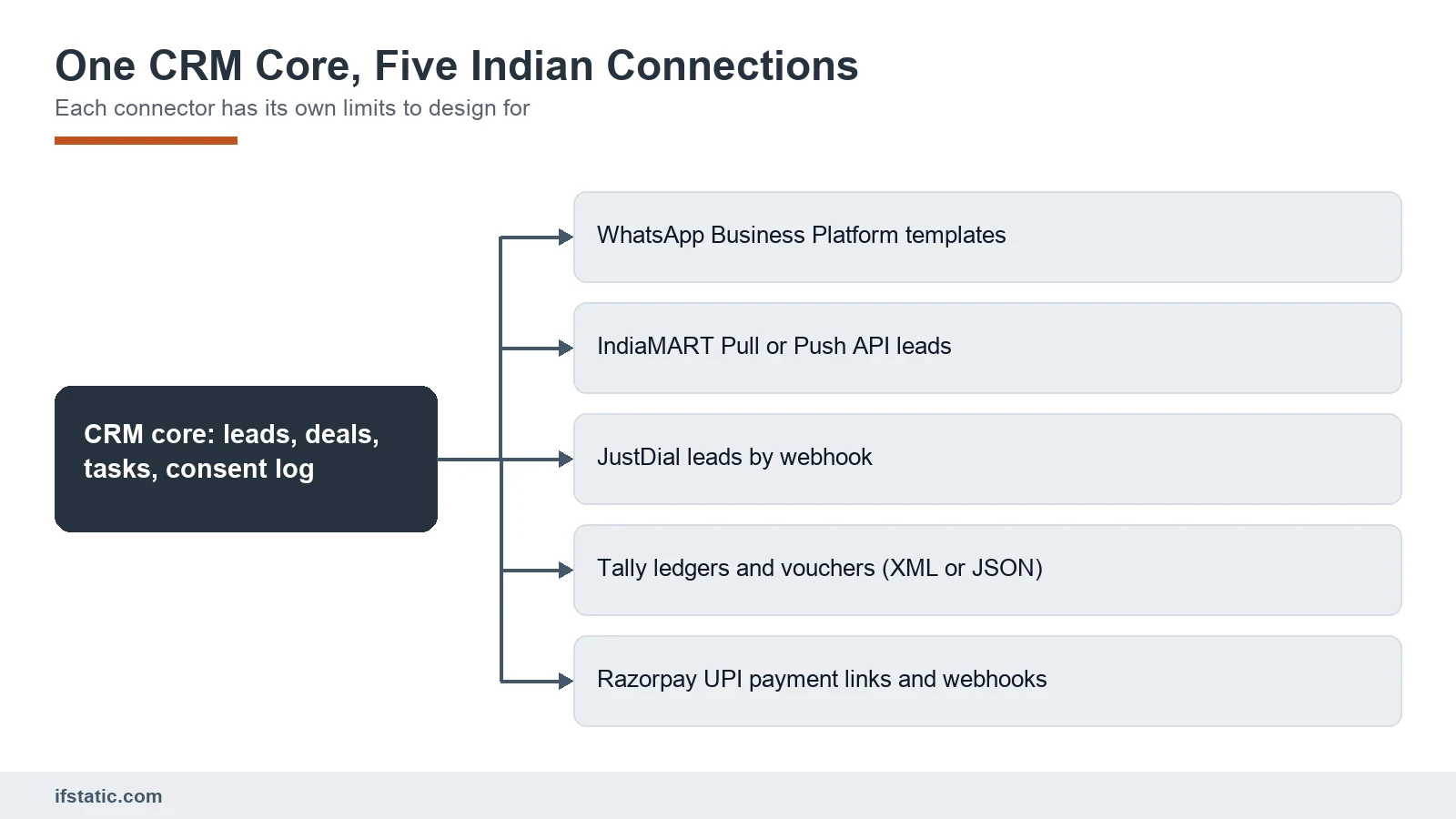
This is where custom CRM software development usually justifies its cost. Global SaaS tools handle email and calendars well, but the friction for an Indian SMB sits in five places: WhatsApp, marketplace lead feeds, Tally, GST invoices and UPI collections. Each one has technical rules and limits that shape the design of the whole system.
WhatsApp Business Platform
Indian customers typically respond to WhatsApp faster than to email, so most CRMs now record every chat on the customer's history. The official route is Meta's WhatsApp Business Platform. According to Meta's WhatsApp pricing documentation, Meta has charged per delivered template message since 1 July 2025.
The India rate card effective 1 July 2026 lists ₹0.8631 per marketing template and ₹0.1150 per utility or authentication template, published in rupees. Meta also says that eligible Indian business accounts must move to INR billing by 31 December 2026 to avoid disruption.
Two important changes to this pricing arrive on 1 October 2026. Service messages, meaning the replies you send inside the 24-hour window after a customer writes, start to be charged. Each business phone number first receives 1,000 free service messages every month, and utility templates sent inside that window also become chargeable.
As a worked example, say your CRM sends 2,000 marketing messages and 3,000 payment reminders a month. That costs about ₹1,726 plus ₹345, or roughly ₹2,071 a month before tax. Add 4,000 service replies and, from October 2026, the 3,000 above the free tier are billed at the service rate on Meta's published rate card. A good CRM counts messages by category, so nobody is surprised by the bill.
A few design rules follow from this. Store each template's name and approval status, track the 24-hour window for every contact, and never let staff send marketing messages from personal phones. If you also want automated replies, read our guide to a WhatsApp chatbot for business.
IndiaMART and JustDial Lead Feeds
IndiaMART offers a Pull API and a Push API for its Lead Manager. The IndiaMART Pull API guide says it is open to paid sellers and returns leads as JSON. It is offered in do-it-yourself mode, so IndiaMART's team will not help with the integration itself.
These limits matter for the design of your integration. Calls must be at least 5 minutes apart, and more than 5 hits in a minute blocks the key for 15 minutes. Each call can cover at most 7 days, only the last 365 days are available, and a key left unused for 7 days expires. Your CRM therefore needs a scheduler that respects all of this and alerts someone when the key stops working.
IndiaMART says its newer Push API syncs leads in real time, and it recommends moving to it. It also lists an official plugin for Zoho CRM, so if you already use Zoho, check that plugin before paying for any custom integration work.
JustDial is harder to pin down, because we could not find public developer documentation from JustDial itself. CRM vendors such as LeadSquared describe a webhook URL that your JustDial account manager sets up, using the GET method. Treat JustDial as a separate project task that needs coordination with your account manager, and confirm the exact fields before development begins.
Tally and GST E-Invoicing
Many Indian SMBs keep their books in TallyPrime, and Tally's own help pages describe three ways in: XML over HTTP, native JSON in newer releases, and ODBC. Through these, outside applications can import and export masters, such as ledgers and stock items, as well as vouchers.
The practical catch is where Tally actually runs. It often sits on one office computer rather than in the cloud, so a cloud CRM cannot call it directly. You need a small connector on that machine, or a scheduled export, to sync customers and unpaid balances. Decide early which system owns each record; usually Tally owns ledgers and invoices, while the CRM owns leads and deals.
GST adds one more rule that affects your design. A CGST trade notice explains that, from 1 August 2023, e-invoicing is mandatory for taxpayers whose aggregate turnover passed ₹5 crore in any year from 2017-18. It covers B2B and export invoices, which must be reported to the Invoice Registration Portal for an IRN and QR code.
For most SMBs the cleanest split is simple. The CRM creates quotes and orders, while your accounting system raises the tax invoice and handles e-invoicing. The CRM then reads back the invoice number and payment status.
UPI Payments Through Razorpay
For collections, a CRM can attach a payment link to each order and mark it paid automatically. Razorpay's documentation describes Payment Links that you can create from the dashboard or through the API, which customers can pay by UPI, cards, netbanking, wallets and other methods. Webhook events tell your system the moment a payment lands, so the deal moves to paid without anyone checking the bank app.
| Integration | How it connects | Design for |
|---|---|---|
| WhatsApp Business Platform | Meta's Cloud API through a business account | Per-message fees, approved templates, 24-hour window |
| IndiaMART | Pull API (JSON) or Push API | 5-minute gap, 7-day window, key expiry |
| JustDial | Webhook set up by your account manager | No public docs; confirm fields first |
| TallyPrime | XML or JSON over HTTP, or ODBC | Office-bound machine, record ownership |
| GST e-invoicing | Through your accounting system | Above ₹5 crore turnover: IRN and QR code |
| Razorpay | Payment Links API and webhooks | Match payments to orders automatically |
The CRM Software Development Process, Step by Step
A CRM project fails more often from unclear business rules than from bad code, so the process below puts the thinking first. It follows the four stages on IfStatic's service page, which are requirement analysis, planning and prototype, development and integration, then testing, deployment and training, split here into finer steps.
- Map the current process: sit with sales, accounts and support staff, and write down every step a lead takes today, including spreadsheets and WhatsApp groups.
- Define the data model by listing the records, such as lead, contact, account, deal and order, with every field, owner and status, which is where GSTIN, consent and lead source fields get decided.
- Design the screens as clickable wireframes and test them with two or three real users before any code is written.
- Build the first release, starting with lead capture, contacts, pipeline, tasks, roles and the consent log.
- Connect the integrations, adding WhatsApp, IndiaMART, Tally and payments one at a time, each with its own error alerts.
- Migrate and test by cleaning the old data, importing it, and running a pilot with one team for two to three weeks.
- Train and launch by role rather than by feature, and name one person inside the business who owns the CRM.
- Improve every month by reviewing which features users ignore and what they request, then releasing small, regular updates.
Step three is where good design saves money, because changing a wireframe takes minutes while changing a built screen takes days. If you want help at that stage, our UI/UX design service covers internal tools as well as apps.
| Phase | Typical length (planning estimate) | What you sign off |
|---|---|---|
| Discovery and process mapping | 1 to 2 weeks | Process map and scope list |
| Data model and wireframes | 2 to 3 weeks | Field list and clickable prototype |
| First release build | 6 to 10 weeks | Core modules on a test server |
| Integrations | 2 to 4 weeks, partly in parallel | Each connector tested with real data |
| Migration, pilot and fixes | 2 to 3 weeks | Pilot team feedback closed |
| Training and launch | 1 to 2 weeks | Go-live checklist |
These durations are planning estimates for an SMB scope of roughly 10 to 50 users, not a quote. Slow third parties, such as a JustDial webhook that waits on an account manager, can stretch them.
Questions to Ask a CRM Software Development Partner
- Who owns the source code and the cloud account when the project ends?
- How exactly will you handle IndiaMART's rate limits and the expiry of unused API keys?
- Where will personal data be stored, and who can export it?
- What does monthly upkeep include, and which kinds of changes are billed as extra work?
- How do you test each release before it reaches our team?
- Can we see a similar internal business tool that you have built and still maintain?
DPDP Act and Rules: What Is in Force as of September 2026
Any CRM holds personal data: names, phone numbers, WhatsApp chats and often addresses. That places it squarely under the Digital Personal Data Protection Act, 2023. The Act was passed in August 2023, but it takes effect in stages. The MeitY page for the DPDP Rules, 2025 carries the Rules, the enforcement timeline and a December 2025 corrigendum.
The timeline notification is dated 13 November 2025 and sets three stages. Some parts started on publication, others start one year later, and the core duties start eighteen months after publication. When we checked the MeitY page on 25 September 2026, it listed no change to these dates.
| Stage | When | What it covers |
|---|---|---|
| On publication | 13 November 2025 | Definitions and the Data Protection Board (Act sections 18 to 26, Rules 17 to 21) |
| One year later | November 2026 | Consent Manager registration (Rule 4) |
| Eighteen months later | May 2027 | Notice, consent, security safeguards, breach reporting, erasure, individual rights and penalties |
So, as of September 2026, the Board exists but most duties on businesses are not yet enforceable. That is not a reason to wait, because a CRM started today will go live close to the date the duties begin. Adding consent records to live data later is slow, expensive and messy.
What the Rules Ask Your CRM to Do
The Rules turn the Act's broad duties into specific operational requirements. Rule 6 asks for reasonable security safeguards, such as encryption or masking, access control, and logs that help you detect and investigate misuse. It also says to keep those logs for at least one year. Rule 7 says that after a breach you must tell affected people without delay, and send the Board a detailed report within 72 hours.
The Rules also ask for a grievance system that answers within ninety days, and a way for people to name someone who can use their rights for them. Most of this work happens inside the CRM, so build it in from the first release:
- A consent record per contact, with purpose, date, source and the notice shown.
- Field-level access, so only the right roles see phone numbers and exports.
- Encryption for stored data and data in transit, plus masked fields in lists.
- Access and change logs that record who viewed or edited each record, kept for at least one year.
- A workflow to find, correct, export or erase a person's data on request.
- A breach playbook with message templates, so the 72-hour clock is not spent drafting emails.
- Written terms with your hosting provider and any developer who handles data for you.
The financial stakes are high once these duties apply. Under the penalty schedule of the DPDP Act, 2023, failing to take reasonable security safeguards can cost up to ₹250 crore. Failing to report a breach can cost up to ₹200 crore. Section 17(3) lets the government exempt some startups from certain duties, but not from these two.
Buying a SaaS product does not move this legal duty elsewhere. The Act calls the business that decides why and how data is processed the Data Fiduciary, while your CRM vendor processes data on your behalf as a Data Processor. You stay answerable either way, so read the vendor's data terms as carefully as its price list.
Total Cost of Ownership Over Five Years
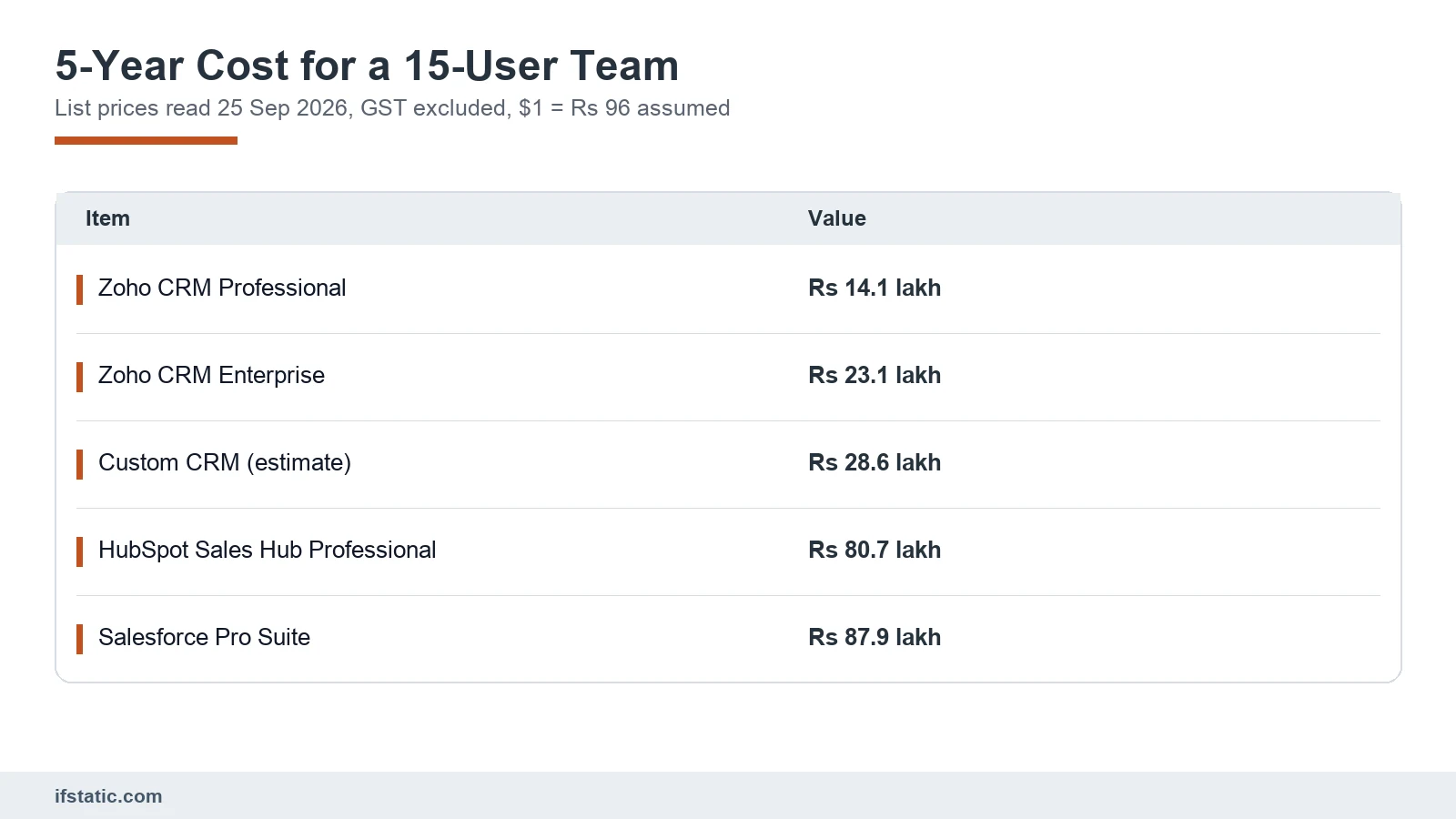
The price per user is only one line of the total bill. A fair comparison runs every option over the same period, for the same team, with every one-time cost included. Here is a model for a 15-person sales team over five years; change any assumption and the answer moves, so treat it as a template for your own numbers.
The Assumptions Behind the Model
- 15 users for all five years, list prices read on 25 September 2026, and no price rises.
- Annual billing for every subscription, with GST left out of every option so they compare fairly.
- An assumed ₹96 per US dollar, close to the market rate on 25 September 2026.
- A ₹1,50,000 setup allowance for each SaaS option: about 100 hours of setup, import and training at ₹1,500 an hour.
- Custom build: 1,000 hours of analysis, design, build and testing at a blended ₹1,200 an hour, which is ₹12,00,000.
- Custom hosting: ₹10,000 a month for a managed server, database, backups and monitoring.
- Custom upkeep: 20% of the build cost a year, from year two, for fixes, updates and small changes.
- Custom migration and training: a one-time ₹1,00,000 for cleaning, importing and teaching.
- WhatsApp and payment fees left out, because you pay them in every option.
| Option (15 users, 5 years) | Licences or build | Other costs | 5-year total, GST excluded |
|---|---|---|---|
| Zoho CRM Professional | ₹12,60,000 | ₹1,50,000 setup | ₹14,10,000 |
| Zoho CRM Enterprise | ₹21,60,000 | ₹1,50,000 setup | ₹23,10,000 |
| Custom CRM (estimate) | ₹12,00,000 build | ₹6,00,000 hosting, ₹9,60,000 upkeep, ₹1,00,000 migration | ₹28,60,000 |
| HubSpot Sales Hub Professional | ₹77,76,000 | ₹1,44,000 onboarding, ₹1,50,000 setup | ₹80,70,000 |
| Salesforce Pro Suite | ₹86,40,000 | ₹1,50,000 setup | ₹87,90,000 |
What the Numbers Say About Building vs Buying
For 15 users, Zoho CRM Professional is the cheapest by a wide margin, at about half the custom estimate. The custom CRM lands between Zoho's Enterprise tier and the dollar-priced tools. Against HubSpot or Salesforce at their professional tiers, the custom build costs about a third as much over five years.
The break-even point moves as your team size changes. Each extra Zoho Professional user adds ₹84,000 over five years, while the custom total stays roughly flat in this model. Custom therefore matches Zoho Professional at about 32 users and Zoho Enterprise at about 19 users. Past those points, every new hire widens the gap in favour of owning the system.
Now it is worth stress-testing the custom estimate. If the build takes 700 hours, the custom total falls to about ₹22 lakh, and if it takes 1,400 hours, it rises to about ₹37 lakh. The model also holds hosting flat, which flatters custom at larger team sizes.
Be honest about the feature gap as well. The SaaS price includes mobile apps, AI features and a vendor security team that a custom first release will not match on day one. Those extras have real value for a small business.
When Custom CRM Development Is the Wrong Fit
Custom work is a poor bet more often than software agencies like to admit. These are the cases where we would tell you to rent instead:
- Wrong fit: a small team on a standard lead-to-deal funnel, which Zoho or HubSpot Starter covers for a fraction of the cost.
- Wrong fit: nobody inside the business can own the project, and a CRM without an owner drifts, whoever built it.
- Wrong fit: you need it live in two weeks, but a first release takes months and rushing it skips the process mapping that makes it useful.
- Wrong fit: the real problem is discipline rather than software, because staff who skip updating a spreadsheet will skip a custom CRM too.
- Wrong fit: the budget only covers the build, and without money for hosting and upkeep the system breaks as browsers, phones and APIs change.
- Wrong fit: your process will change a lot in the next year, so rent while the business settles and build once the process is stable.
In practice, a middle path often works best for growing businesses. Start on a SaaS CRM and learn what your team actually uses. Then build a custom system, or a custom layer on top, when the per-user bill and the integration gaps both start to hurt.
Conclusion
The choice between renting and building a CRM comes down to three numbers: users, years and integrations. Small teams on a standard funnel should rent, and Zoho's rupee pricing makes that an easy decision. Growing teams with IndiaMART, JustDial, Tally and WhatsApp at the centre of their sales often reach the point where CRM software development pays for itself, especially against dollar-priced tools.
Whichever way you go, design for the DPDP duties that begin in May 2027 now, not later. If you want a second opinion on your numbers, talk to IfStatic about your process and ask for a quote, or look through our software development portfolio first.
Frequently Asked Questions
How much does CRM software development cost in India?
There is no fixed price, because the cost follows the scope of the project. As a planning estimate, a first release for an SMB might take 700 to 1,400 hours. At a blended ₹1,200 an hour, that is roughly ₹8.4 lakh to ₹16.8 lakh for the build alone. Hosting, upkeep, data migration and staff training come on top of that figure. Ask any vendor to break a quote into hours per module.
How long does it take to build a custom CRM?
A focused first release usually takes three to five months as a planning estimate. That covers process mapping, the data model and wireframes, the core build, integrations, a pilot and training. Slow third parties can stretch it, such as a JustDial webhook that your account manager must configure. Plan for regular monthly improvements after launch rather than one enormous delivery.
Is Zoho CRM cheaper than building our own CRM?
For small teams on a standard sales process, the answer is usually yes. On 25 September 2026, Zoho CRM Professional cost ₹1,400 per user per month on annual billing, plus GST. In our five-year model for 15 users, that totals about ₹14.1 lakh, against about ₹28.6 lakh for a custom CRM. Under the stated assumptions, custom only matches Zoho Professional at around 32 users.
Does the DPDP Act apply to a small business CRM?
You should plan as if it does, because the Act covers digital personal data and a CRM is full of it. As of September 2026, the Data Protection Board exists, but duties such as notice, consent, security safeguards and breach reporting start around May 2027. Even a notified startup exemption under section 17(3) does not remove the security and breach duties.
Can a custom CRM pull leads from IndiaMART and JustDial automatically?
Yes, within the technical limits that each lead platform sets. IndiaMART's Pull API gives paid sellers their leads as JSON, but calls must be at least five minutes apart and each can cover at most seven days. Its newer Push API sends leads to your system in real time. We found no public JustDial developer docs, so its webhook is set up through your JustDial account manager.
Should our CRM create GST invoices?
Usually not, because it is cleaner to let the CRM handle leads, quotes and orders while your accounting system raises the tax invoice. If your aggregate turnover crossed ₹5 crore in any year since 2017-18, B2B invoices must also go to the Invoice Registration Portal for an IRN and QR code.
Sources, Method and Author
How this guide was researched: we read the Google India top 10 for "CRM software development" on 25 September 2026 and six competing pages in full. We opened the official pricing pages, Meta's WhatsApp documentation, IndiaMART's API guide, Tally and Razorpay help pages, a CGST trade notice, and the DPDP Act and Rules on MeitY. We found no public JustDial developer documentation, and the custom costs and timelines are estimates.
About the author: Aman Raj is a Director and Website Designer at IfStatic Technologies in Greater Noida West. He works on the design, build and launch of websites and apps for IfStatic clients and writes the company's guides on planning digital projects.