
Google Ads Cost in India: How Pricing Works and What to Budget
Google Ads cost in India has no fixed price, because every click is sold through an auction that Google runs each time someone searches. You choose a budget, compete for clicks, views or impressions, and in most cases pay GST on top of what you actually spent. This guide explains each part and works through a complete budget, and our digital marketing services team can help if you prefer support.
Here is the short version for planning purposes. Google sets no general minimum spend, and a campaign can spend up to twice its daily budget on a busy day. The monthly charge, however, is capped at 30.4 times that average daily budget. Whether the money performs depends less on the budget itself and more on your click price, your conversion rate and the waste you eliminate.
Key Takeaways
- Google Ads cost in India is decided by an auction on every search, so no advertiser pays a fixed price per click.
- Google publishes no general minimum spend, although the Google Ads API has enforced a Demand Gen floor of 5 US dollars a day since April 2026.
- A campaign can spend up to twice its average daily budget on one day, but monthly charges never exceed 30.4 times that budget.
- Most accounts pay 18% GST on advertising spend, and businesses may also need to deduct 2% TDS on payments to Google India.
- Cost per lead equals cost per click divided by conversion rate, so improving your landing page can reduce costs as much as cheaper clicks.
How Google Ads Pricing Actually Works
Google Ads operates as an auction rather than a rate card. When someone searches, Google identifies every eligible ad that matches the query, removes ads that break policy or target another country, and ranks the remainder. You never purchase a fixed position, only the opportunity to compete in each individual auction, so the price changes from one search to the next.
The Auction and Ad Rank
Google's page on how Ad Rank is calculated explains that Ad Rank is worked out separately in every auction. It is calculated once to decide whether your ad is eligible, and again to decide its position against competing advertisers. Google lists six factors, which explains why your cost per click fluctuates even when you change nothing.
- Your bid, which is the maximum amount you are willing to pay for a single click.
- The quality and relevance of your ad, together with the usefulness of your landing page.
- Ad Rank thresholds, meaning the minimum quality level an ad must reach before it can appear.
- The competitiveness of that particular auction, including how closely matched the other advertisers are.
- The context of the search, such as the search terms, the device, the location and the time.
- The expected impact of ad assets, including phone numbers and additional links to specific pages.
The same page makes an important point for businesses with modest budgets. Your bid is only a ceiling, and the amount you actually pay is often lower. A relevant advertisement with a useful landing page can therefore win a better position than a competitor who bids more, while still paying less per click.
Quality Score Is a Health Check, Not a Price
Many Indian guides claim that a high Quality Score directly reduces your bill, but Google's own Quality Score help page is more careful. It describes Quality Score as a diagnostic tool, scored from 1 to 10 for each keyword, and states that it is not an input in the ad auction.
The score still deserves attention, because its three components point at the same qualities the auction rewards: expected clickthrough rate, ad relevance and landing page experience. If any component reads below average, improve that area first. A fast, clear page built by an experienced website development team usually improves both your ad quality and your conversion rate.
What CPC Benchmarks Can and Cannot Tell You
Google does not publish an official average cost per click for India, so the India ranges quoted in most articles are estimates from agency accounts or third-party tools. The largest open benchmark we could verify is the LocaliQ 2026 search advertising benchmarks, which draw on thousands of its customers' Google Ads and Microsoft Ads campaigns.
Read those figures carefully, because they are in US dollars and the report never states that the data comes from India. Treat them as a global reference only. Across all industries, the 2026 averages were a $5.42 cost per click, an 8.18% conversion rate and a $66.69 cost per lead.
| Industry (LocaliQ 2026, USD) | Average CPC | Average conversion rate | Average cost per lead |
|---|---|---|---|
| All industries | $5.42 | 8.18% | $66.69 |
| Attorneys and legal services | $9.87 | 5.55% | $131.63 |
| Dentists and dental services | $8.00 | 10.67% | $72.97 |
| Education and instruction | $4.81 | 13.14% | $77.48 |
| Business services | $5.87 | 4.85% | $93.69 |
| Real estate | $3.22 | 3.70% | $102.51 |
| Restaurants and food | $2.05 | 8.05% | $30.57 |
Two lessons carry over to India even if the dollar figures do not. First, the difference between industries is enormous, so an average covering every business tells you very little about your own category. Second, a cheap click is not always a cheap lead, and real estate shows one of the lowest click prices here but one of the highest costs per lead.
For a local estimate, open Keyword Planner inside your Google Ads account and set the location to your own city. Google says the tool shows monthly search estimates for each keyword and the average cost for your advertisement to appear on those searches. That is a far more reliable starting point than any national average.
What Google Ads Cost in India Really Includes
The click price is only one line on the bill, so a realistic view of Google Ads cost in India should include every cost that leaves your business.
| Cost item | Who charges it | How it is worked out |
|---|---|---|
| Ad spend | The clicks, views or impressions you win, within your budget limits | |
| GST | Google, on the invoice | 18% in total for most accounts, 0% for SEZ units |
| TDS | You deduct it, if it applies to you | 2% of the amount before GST, on payments to Google India |
| Management fee | Your agency or freelancer | Share of spend, flat retainer, hybrid or per lead |
| Landing page and tracking | Your web team or agency | One-time build, then small upkeep |
| Follow-up time | Your own team | Calls, WhatsApp replies and follow-ups on every lead |
Minimum Spend: None, With One Exception
Google does not publish a general minimum spend, and its help pages describe the budget as the average amount you are comfortable spending each day. Its practical advice is to start small and check results daily. Google's India site also advertises ad credit offers for new advertisers, but each credit unlocks only after you meet that offer's spending condition.
The only hard floor we found applies to Demand Gen campaigns. A February 2026 Google Ads developer note says the API now enforces a minimum daily budget of 5 US dollars, or the local equivalent, for all Demand Gen campaigns. The rule took effect on 1 April 2026.
Existing Demand Gen campaigns below the floor continue running, although any future budget change must meet it. Elsewhere a tiny budget is permitted, but it may teach you very little, because a handful of weekly clicks can take months to reveal which keywords generate enquiries.
GST, TDS and Who Invoices You
Google's taxes help page for India names two possible service providers for Indian accounts: Google India Private Limited, known as GIPL, and Google Asia Pacific. Your invoice shows which entity serves you, and the tax treatment differs slightly between them.
- GIPL charges GST on all purchases, applying CGST 9% plus SGST 9% to Haryana bill-to addresses and IGST 18% to everyone else.
- Advertisers operating inside a Special Economic Zone (SEZ) pay 0% GST on their Google Ads invoices.
- For GIPL accounts, a GSTIN is mandatory for business accounts and optional for individual accounts.
- If Google Asia Pacific serves your account, it charges 18% GST unless you provide a valid GSTIN.
- Google states that the current TDS rate on advertising payments to GIPL is 2%, calculated on the amount excluding GST.
- Google cannot modify or re-issue finalised invoices after a tax ID change, so add your GSTIN before the first invoice.
In practice, ₹30,000 of advertising spend becomes ₹35,400 once 18% GST is added. If your business is GST registered, ask your chartered accountant whether you can claim that amount as input tax credit, since Google itself says it cannot give tax advice.
For GIPL invoices, Delhi NCR businesses should notice the Haryana rule: a Gurugram bill-to address pays CGST plus SGST, while Noida and Delhi addresses pay IGST. The total remains 18% either way, but the split on the invoice differs, and your accountant will want to see it.
Daily Budgets, Overspend Days and the Monthly Limit
This part of Google Ads pricing surprises most new advertisers. You set an average daily budget for each campaign rather than a hard daily cap, so Google may spend more on busy days and less on quiet ones.
Google's page on choosing your bid and budget sets out the limits clearly. A campaign will never spend more than twice its average daily budget on a given day. Across a billing period, you are never charged more than 30.4 times that daily budget, which is simply the average number of days in a month.
| Average daily budget | Most it can spend in one day | Monthly charging limit (x 30.4) | Monthly limit plus 18% GST |
|---|---|---|---|
| ₹500 | ₹1,000 | ₹15,200 | ₹17,936 |
| ₹1,000 | ₹2,000 | ₹30,400 | ₹35,872 |
| ₹2,000 | ₹4,000 | ₹60,800 | ₹71,744 |
| ₹5,000 | ₹10,000 | ₹1,52,000 | ₹1,79,360 |
So there is no reason to panic when a single day shows double the expected spend, because the monthly total is what counts. To convert a monthly plan into a daily budget, divide it by 30.4, which turns a ₹30,000 monthly plan into an average daily budget of about ₹987.
The same page notes that most people begin with Maximize Clicks or Manual CPC bidding, which is sensible for a new account. The budgeting mistakes below usually cost far more than a slightly high bid.
- Dividing a monthly budget by 30 or 31 instead of 30.4, and then wondering why the month finished over or under plan.
- Putting every service into one campaign, so the cheapest keywords absorb the whole budget and the valuable ones never show.
- Raising the budget before conversion tracking works, which only scales spending that nobody can measure properly.
- Changing budgets and bids every day, which makes it almost impossible to identify what actually caused a change in results.
A Worked Example of Google Ads Cost in India
Here is how to size a budget from the number of leads you need rather than from a round figure. The business is an imaginary local service company in Greater Noida West that sells through phone calls and website enquiries. Every figure below is an assumption for the example, not a benchmark and not a quotation.
| Input | Value | Where it comes from |
|---|---|---|
| Monthly ad budget before GST | ₹30,000 | The owner's choice for a first test |
| Average daily budget | ₹987 | ₹30,000 divided by 30.4 |
| Average cost per click | ₹40 | Assumption. Replace it with your Keyword Planner estimate |
| Landing page conversion rate | 4% | Assumption. Replace it with your own data after a month |
| Leads that become customers | 1 in 5 (20%) | Assumption. Use your own close rate |
| GST on ad spend | 18% | Google Ads taxes help page for India |
With those inputs, the calculation takes six steps, and each step uses only the figures in the table above.
| Step | Formula | Result |
|---|---|---|
| Clicks | Budget ÷ cost per click = ₹30,000 ÷ ₹40 | 750 clicks |
| Leads | Clicks × conversion rate = 750 × 4% | 30 leads |
| Cost per lead | Budget ÷ leads = ₹30,000 ÷ 30 | ₹1,000 |
| Customers | Leads × close rate = 30 × 20% | 6 customers |
| Total paid to Google | ₹30,000 × 1.18 (18% GST) | ₹35,400 |
| Cost per customer with GST | ₹35,400 ÷ 6 | ₹5,900 |
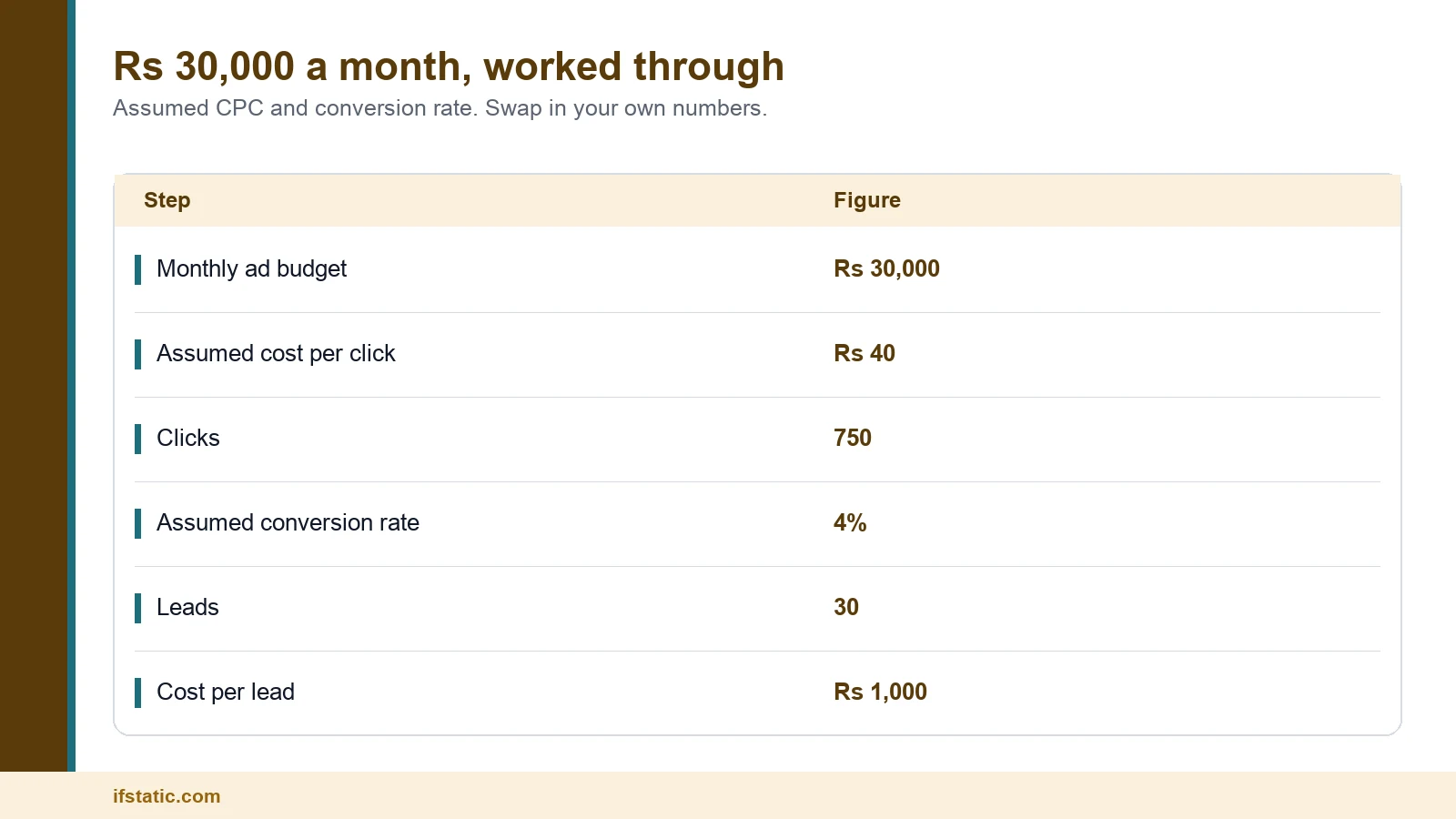
The final line is the one that matters most. If the profit from one customer comfortably exceeds ₹5,900, the campaign can pay for itself before any repeat business arrives. If it does not, a bigger budget simply loses money faster, so improve the conversion rate or the close rate first.
You can also run the calculation in reverse. If you need 50 leads a month and expect a ₹1,000 cost per lead, plan ₹50,000 of advertising spend plus ₹9,000 of GST. After the first month, compare the real cost per lead with your estimate and adjust accordingly.
How Sensitive the Numbers Are
Cost per lead is simply your cost per click divided by your conversion rate, which means a better landing page can matter as much as a cheaper click. The grid below applies the same formula to a range of assumed values.
| Assumed CPC | At 2% conversion | At 4% conversion | At 8% conversion |
|---|---|---|---|
| ₹20 | ₹1,000 per lead | ₹500 per lead | ₹250 per lead |
| ₹40 | ₹2,000 per lead | ₹1,000 per lead | ₹500 per lead |
| ₹80 | ₹4,000 per lead | ₹2,000 per lead | ₹1,000 per lead |
Reading across any row, the cost per lead halves each time the conversion rate doubles. Reading down any column, it doubles each time the click price doubles. An ₹80 click on a page converting at 8% therefore costs the same per lead as a ₹20 click on a page converting at 2%.
That is why landing page improvements often pay back faster than bid reductions. If your page needs a rebuild, our guide to what a new business website costs explains the price bands and the trade-offs involved.
Campaign Types, Bidding Strategies and Agency Fees
Where your advertisements appear changes what you are paying for. A search click from someone ready to buy is usually worth more than a video view from someone scrolling, so match each campaign type to a specific business goal.
Which Campaign Type Fits Your Budget
| Campaign type | Where ads show | Usually best for | Wrong fit |
|---|---|---|---|
| Search | Text ads on Google search results | Leads and sales from people already searching | Wrong fit: a new product nobody searches for yet |
| Performance Max | All Google Ads channels from one campaign | Accounts with reliable conversion tracking and good assets | Wrong fit: no conversion tracking, since it bids towards your goals |
| Display | Image ads on websites and apps | Reach, and remarketing to past visitors | Wrong fit: a first test that must bring leads this month |
| YouTube (Video) | Video ads on YouTube and other sites | Awareness and consideration | Wrong fit: no video you would be proud to show |
| Demand Gen | YouTube including Shorts, Discover, Gmail and the Display Network | Visual ads that create new interest | Wrong fit: budgets below the Demand Gen daily floor |
One 2026 change matters here. Google's Demand Gen help page says Display campaigns are moving into Demand Gen, with a voluntary migration tool available to eligible advertisers from June 2026. Later, new campaigns of this kind can only be created inside Demand Gen, so any display plan should allow for the Demand Gen budget floor.
For most small Indian businesses, a Search campaign is the sensible first step. It reaches people who already want what you sell, and it is the easiest campaign type to measure accurately.
Bidding Strategies in Plain Words
Your bid strategy tells Google what to buy with your budget, and Google's bid strategy guide groups the available options by advertising goal.
- Clicks: Maximize clicks, Target CPC or Manual CPC, which suit a new account that has no conversion data yet.
- Conversions: Maximize conversions, or Target CPA, which aims for a specific cost per action such as a lead.
- Conversion value: Maximize conversion value, or Target ROAS, which aims for a specific return on advertising spend.
- Visibility: Target impression share, which aims to place your advertisement at the top or absolute top of the page.
- Views and reach: CPV for video views, plus CPM or vCPM for impressions on YouTube and the Display Network.
Conversion strategies are only as reliable as your tracking, because Google cannot bid towards leads it cannot see. Start with clicks or manual bids, fix the tracking, and move to conversion bidding once leads are recorded consistently.
Agency Management Fee Models
If an agency or freelancer manages your account, their fee sits on top of advertising spend. There is no standard rate in India, so compare the pricing model as well as the number, and note the figures in this section are illustrations, not market prices.
| Fee model | How it works | Good for | Wrong fit |
|---|---|---|---|
| Share of ad spend | A set percentage of what you spend each month | Growing accounts where work rises with spend | Wrong fit: very small budgets, where the share cannot cover the work |
| Flat monthly retainer | The same fee every month | Steady budgets with a clear scope | Wrong fit: fast scaling with a vague contract |
| Hybrid | A base fee plus a share above a set spend | Mid-size accounts that expect growth | Wrong fit: owners who want one simple number |
| Per lead or per sale | A fee for each agreed result | Businesses with a clear, checked lead definition | Wrong fit: weak tracking, where results cannot be checked |
| One-time setup fee | Account build, tracking and landing page | New accounts | Wrong fit: an account that is already set up well |
Here is a comparison using invented numbers. At 15% of spend, the ₹30,000 example above would cost ₹4,500 a month in management fees. A flat ₹10,000 retainer would cost more at that level, but less once monthly spend passes about ₹66,700. In either case, ask whether GST is added to the fee.
Ownership matters more than the fee itself. The Google Ads account and its billing should sit in your business name and under your GSTIN, with the agency managing it through a manager account. That way you keep the data and the history if you ever change partners.
How to Cut Wasted Spend Before You Raise the Budget
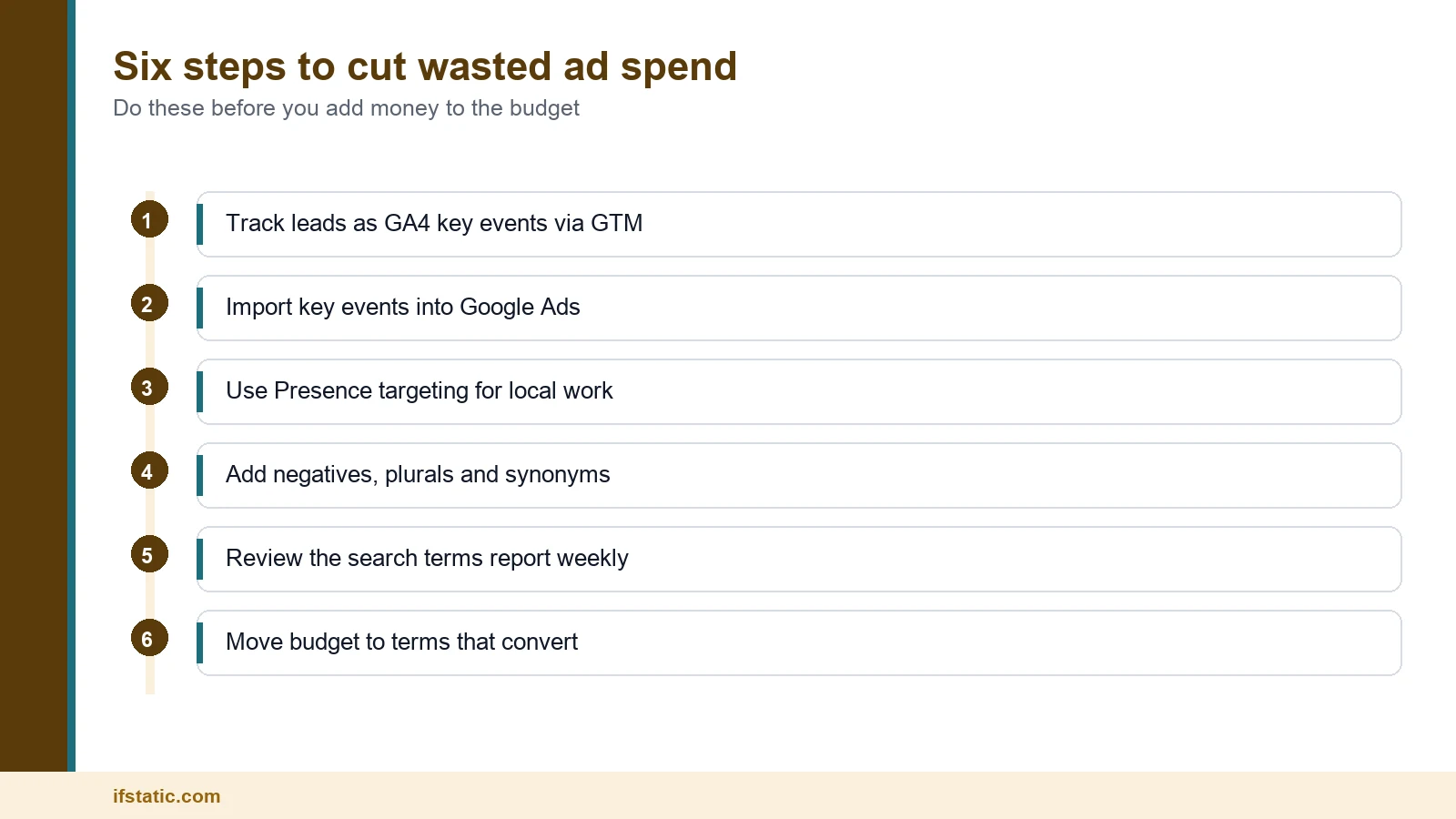
Three settings largely decide how much of your budget is wasted: conversion tracking, location targeting and negative keywords. Get them right first, and every rupee you add afterwards stretches further, because your Google Ads cost in India then buys enquiries instead of stray clicks.
Track Leads With GA4 and Google Tag Manager
Without tracking, you are paying for clicks and guessing about leads. The usual set-up sends form submissions, phone calls and WhatsApp clicks to Google Analytics 4 through Google Tag Manager. Those actions are then marked as key events and imported into Google Ads as conversions.
Google's set-up guide lists the requirements. You need Admin access in Google Ads and Edit access in the linked Analytics property, and only events marked as key events in Analytics can be imported. Google Ads also offers its own conversion tag, which you can install through Tag Manager instead.
Tighten Location Targeting
By default, Google shows ads to people located in your chosen area and also to people who have shown interest in it, a setting called Presence or Interest. For a clinic in Noida or a salon in Gurugram, someone in another state reading about your city is unlikely to become a customer.
Google's own guidance suggests the Presence setting when you only want people who are in, or regularly in, your target area. For local services that is usually the right choice, combined with a radius around your address and exclusions for areas you cannot serve.
Build Negative Keyword Lists
Negative keywords stop your ads from appearing for searches you do not want to pay for. Google's help page adds a detail many advertisers miss: negative keywords do not match close variants, so excluding job does not exclude jobs or similar words like vacancy.
- Job seekers, who typically search with words such as job, jobs, vacancy, salary, hiring or internship.
- Students and learners, who add terms such as course, training, syllabus, PDF, notes or tutorial.
- Bargain hunters, if you sell a premium service, who use words such as free, cheapest or second hand.
- People with different intent, who search for DIY methods, definitions, meanings or images.
- Competitor brand names, unless you have a deliberate strategy and budget for bidding on them.
Save these as an account-level list so they apply across all eligible search inventory. Then open the search terms report every week and add fresh negatives from the real searches you paid for.
A Simple Plan for the First 90 Days
- Days 1 to 7: set up GA4, Tag Manager and key events, then test a form submission and a phone call yourself.
- Days 1 to 30: run one Search campaign with tightly grouped keywords, Presence targeting and a starter negative keyword list.
- Days 31 to 60: review search terms weekly, pause keywords that spend without producing leads, and improve the landing page.
- Days 61 to 90: once leads are tracked reliably, test a conversion bid strategy, and only then consider raising the budget.
Paid search works best alongside organic search rather than instead of it. If you are comparing the two channels, our breakdown of what SEO costs in India explains how SEO pricing works for Indian businesses.
Conclusion
Google Ads cost in India comes down to four things you control: your budget, your click price, your conversion rate and the waste you remove. Google sets no general minimum and adds 18% GST for most accounts. A single day can reach twice your daily budget, but a month never exceeds 30.4 times it.
Start with the number of leads you need, work backwards to a budget, and test it against real results for at least a month. If you would like a second opinion on your plan or your tracking set-up, talk to the IfStatic team and we will review it with you.
Frequently Asked Questions
Is there a minimum budget for Google Ads in India?
No general minimum exists. You choose an average daily budget for each campaign, and Google recommends starting small and checking results daily. The one floor we found applies to Demand Gen campaigns. There, the Google Ads API has enforced a minimum daily budget of 5 US dollars, or the local equivalent, since 1 April 2026.
Is GST charged on Google Ads in India?
Yes, for most advertisers. Google India Private Limited charges CGST 9% plus SGST 9% when your bill-to address is in Haryana, and IGST 18% for everyone else, while SEZ advertisers pay 0%. Add your GSTIN before your first invoice, because Google cannot re-issue finalised invoices after a tax ID change, and ask your accountant about input tax credit.
Why did Google Ads spend more than my daily budget?
Your daily budget is an average rather than a hard cap. Google may spend up to twice the average daily budget on a busy day to capture extra traffic. Across the month, however, you are never charged more than 30.4 times that figure, so check the monthly total in your budget report rather than one day.
How much should a small business spend on Google Ads each month?
Work backwards from the number of leads you need. Estimate your cost per click in Keyword Planner, assume a realistic conversion rate, and calculate cost per lead by dividing the CPC by that rate. Multiply the result by your target number of leads, add 18% GST, and test for at least a month before raising the budget.
How much does a Google Ads agency charge in India?
There is no standard rate. The common pricing models are a percentage of advertising spend, a flat monthly retainer, a hybrid of the two, a fee per lead, and a one-time setup fee. Compare each model against your budget, confirm whether GST is added, and make sure the account and billing stay in your business name.
How can I lower my cost per click on Google Ads?
Improve the parts of the auction you control. Tighten keywords so advertisements match intent, write ads that reflect the search closely, and send visitors to a fast, relevant landing page. Quality Score shows where you are weak across expected clickthrough rate, ad relevance and landing page experience. Negative keywords and tighter location settings also reduce waste, even when your cost per click stays the same.
Sources, Method and Author
How this guide was researched: we read the Google India top 10 for this keyword on 25 September 2026 and five competing guides in full. Every rule on the auction, budgets, GST, TDS and bidding comes from Google Ads Help pages and a Google developer note opened that day. CPC benchmarks come from LocaliQ in US dollars, Google publishes no India averages, and all rupee figures in the example are assumptions.
About the author: Aman Raj is a Director and Website Designer at IfStatic Technologies in Greater Noida West. He works on the design, build and launch of websites and apps for IfStatic clients and writes the company's guides on planning digital projects.